22.1 SPICE-based circuit simulators

🔌Intro to Electrical Engineering Unit 22 Review
22.1 SPICE-based circuit simulators
🔌 Intro to Electrical Engineering
SPICE Variants
SPICE-based circuit simulators let you analyze electronic circuits using mathematical models instead of building physical prototypes. They solve systems of equations that describe how voltages and currents behave throughout a circuit, giving you waveforms and data you can use to predict real-world performance. For an intro EE course, the main thing to know is what these tools are, how they're set up, and what kinds of results they produce.
Popular SPICE Simulators
SPICE (Simulation Program with Integrated Circuit Emphasis) is the original. It was developed at UC Berkeley in the 1970s as an open-source analog circuit simulator, and nearly every modern variant builds on its core algorithms.
Several widely used versions have branched off from that original:
- PSpice is a commercial version now owned by Cadence Design Systems. It adds a graphical interface and extra features on top of the original SPICE engine.
- LTspice is a free simulator from Analog Devices (originally Linear Technology). It's popular in intro courses because it's easy to install, has a large built-in component library, and runs fast for most circuits you'll encounter.
- NgSpice is an open-source option compatible with multiple SPICE formats. It primarily uses a command-line interface, though third-party tools like KiCad integrate it with graphical schematic editors.
Other SPICE-based Simulators
These are less common in intro courses but worth knowing about:
- HSPICE (Synopsys) is a high-accuracy commercial simulator used heavily in the semiconductor industry for IC design.
- Xyce (Sandia National Laboratories) is open-source and designed for large-scale parallel simulations of very big circuits.
- TINA-TI is a free simulator from Texas Instruments that comes with a library of TI components and a beginner-friendly schematic capture interface.
- Micro-Cap was a commercial simulator from Spectrum Software known for its intuitive interface and mixed analog-digital capabilities. (Note: Spectrum Software closed in 2019 and released Micro-Cap 12 as freeware.)
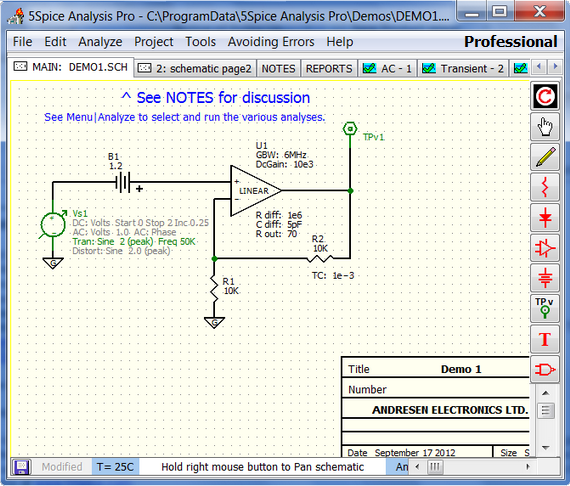
Circuit Simulation Basics
Simulation Setup
Running a SPICE simulation follows a general workflow:
-
Draw or describe the circuit. You either use a schematic editor (graphical) or write a netlist directly. A netlist is a text file that lists every component, its value, and which nodes it connects to.
-
Assign component models. The simulator pulls from model libraries that contain mathematical descriptions of how each component behaves. A resistor model is simple; a MOSFET model can have dozens of parameters.
-
Choose your analysis type. The three most common are:
- DC analysis finds the steady-state operating point of the circuit
- AC analysis sweeps frequency to show gain and phase response
- Transient analysis simulates the circuit over time, producing voltage and current waveforms
-
Run the simulation. The simulator solves the circuit equations and generates output data.
Subcircuits are reusable blocks you can define once and drop into a larger design multiple times. Think of them like functions in programming. They keep your netlist organized and make modular design much easier.

Simulation Results
SPICE simulators output node voltages, branch currents, and derived quantities like power dissipation or gain. You view these using a waveform viewer, which plots the data so you can inspect time-domain behavior (like a step response) or frequency-domain behavior (like a Bode plot from AC analysis).
Two advanced analysis techniques you should be aware of:
- Monte Carlo analysis runs the same simulation many times, each time randomly varying component values within their tolerances. This tells you how manufacturing variations might affect your circuit's performance.
- Sensitivity analysis changes one component value at a time and measures how much the output shifts. This helps you figure out which components matter most to your design's performance.
Simulation Considerations
Convergence and Accuracy
Convergence means the simulator successfully found a solution to the circuit equations within its allowed number of iterations and error tolerance. When convergence fails, the simulator can't solve the circuit, and you get an error instead of results.
Common causes of convergence problems:
- Highly nonlinear components (like diodes or transistors at extreme operating points)
- Floating nodes (nodes not connected to a DC path to ground)
- Poor or missing initial conditions for transient analysis
Fixes include adding small resistances to floating nodes, providing initial voltage guesses with .ic statements, or relaxing the simulator's tolerance settings.
Accuracy depends on three things: how detailed your component models are, how tight you set the error tolerances, and how small your time steps are. More detailed models (like BSIM for MOSFETs) give more realistic results but take longer to compute. The best practice is to verify simulation results against hand calculations or lab measurements when possible.
Simulation Speed and Efficiency
Larger circuits with complex models take longer to simulate. A few strategies help:
- Simplify models where high accuracy isn't needed. You don't need a 50-parameter transistor model for every rough estimate.
- Control time steps. Smaller steps increase accuracy but slow things down. Let the simulator adapt its step size automatically when possible.
- Use hierarchical design. Breaking a big circuit into subcircuit blocks helps the simulator (and you) manage complexity.
- Behavioral modeling with languages like Verilog-A lets you describe a complex block (like an op-amp) with high-level math equations instead of simulating every internal transistor. This can dramatically speed up simulation of large systems.
See Fiveable more often in Google
Mark Fiveable as a preferred source and Google is more likely to show you our guides in Top Stories, with a "preferred" badge in AI Mode and AI Overviews.