11.1 Project Planning and Scheduling

👷🏻♀️Intro to Civil Engineering Unit 11 Review
11.1 Project Planning and Scheduling
👷🏻♀️ Intro to Civil Engineering
Project Planning and Scheduling
Project planning and scheduling form the backbone of construction management. They answer three fundamental questions: What needs to happen? In what order? And with what resources? Without solid answers to these, even well-funded projects spiral into delays and cost overruns.
This topic covers the core tools (CPM, Gantt charts, PERT), the components that make up a project plan, how resource decisions reshape schedules, and how you measure whether a project is actually on track.
Project Scheduling with CPM and Gantt Charts
Critical Path Method (CPM) Fundamentals
The Critical Path Method (CPM) identifies the longest sequence of dependent tasks in a project. That longest sequence determines the shortest possible project duration, because you can't finish the project any faster than its longest chain of must-do-in-order tasks.
Here's how CPM works, step by step:
- List all project activities and estimate how long each one takes.
- Determine dependencies between activities (which tasks must finish before others can start).
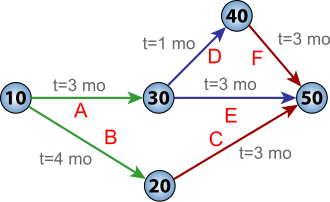
- Build a network diagram that visually maps out these task relationships.
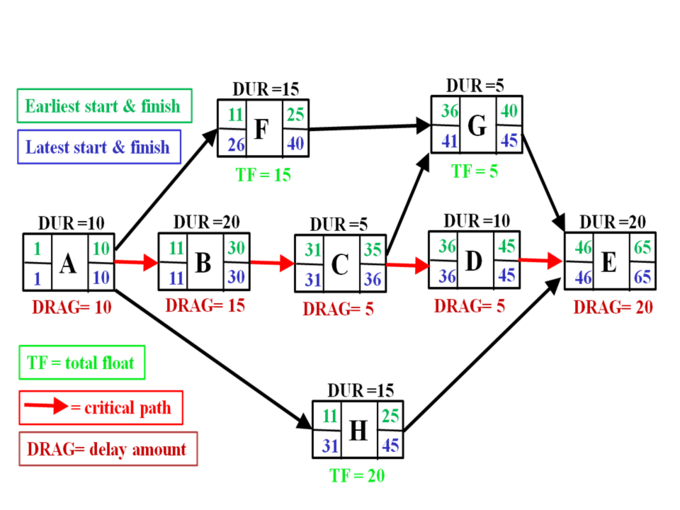
- Perform a forward pass through the network, calculating the early start (ES) and early finish (EF) for each activity.
- Perform a backward pass, calculating the late start (LS) and late finish (LF) for each activity.
- Calculate float (slack) for each activity: . Float is how long an activity can be delayed without pushing back the project completion date.
- Identify the critical path: every activity with zero float sits on the critical path. Any delay to these tasks delays the entire project.
The critical path is the longest path through the network diagram. Non-critical activities have positive float, meaning they have some scheduling flexibility.
Gantt Chart Creation and Integration
A Gantt chart is a horizontal bar chart that plots project tasks against a timeline. Each task appears as a bar whose length represents its duration.
To build a Gantt chart:
- List all project activities vertically.
- Determine start and end dates for each task.
- Draw horizontal bars on a timeline representing each task's duration.
- Connect dependent tasks with arrows to show relationships.
- Mark milestones (significant project events like "foundation complete") with diamond shapes.
Gantt charts can also display resource assignments alongside task bars and show a baseline schedule so you can compare planned progress against actual progress.
When you combine CPM analysis with a Gantt chart, you get a comprehensive view: the Gantt chart shows the overall timeline at a glance, while CPM data highlights which tasks are critical and where float exists.
Project Scheduling Software Tools
Several software tools automate CPM calculations and Gantt chart generation:
- Microsoft Project is widely used and offers robust scheduling, CPM analysis, and Gantt chart features.
- Primavera P6 (by Oracle) handles complex, large-scale projects and is common in heavy civil construction.
- Oracle Primavera Cloud adds collaborative, cloud-based scheduling to Primavera's capabilities.
- ProjectLibre is a free, open-source alternative that covers CPM and Gantt chart basics.
- Smartsheet provides a spreadsheet-style interface with Gantt chart visualization.
- Asana combines task management with basic Gantt chart functionality, better suited for simpler projects.
When choosing software, consider project complexity, team size, collaboration needs, and budget. A small residential project doesn't need Primavera P6; a highway megaproject probably does.
Project Plan Components
Scope and Work Breakdown Structure
Project scope defines the boundaries of the project: what will be delivered, what the objectives are, and what constraints apply. A scope statement documents the project goals, deliverables, and success criteria so everyone agrees on what "done" looks like.
The Work Breakdown Structure (WBS) takes that scope and breaks it down hierarchically into smaller, manageable pieces called work packages. Think of it like an outline: the full project sits at the top, major phases sit below it, and each phase breaks into specific tasks.
A few key WBS concepts:
- The 100% rule states that the WBS must capture all project work, with no omissions and no overlaps.
- A WBS dictionary provides detailed descriptions of each work package (what's included, who's responsible, estimated cost).
- The scope baseline combines the scope statement, WBS, and WBS dictionary into one reference document.
- A change control process manages any modifications to scope throughout the project lifecycle, preventing uncontrolled "scope creep."
Timeline and Resource Allocation
The project timeline sequences all activities, milestones, and deadlines from start to finish. A milestone list calls out key events (like "steel delivery" or "inspection complete") and their target dates.
Resource allocation assigns the people, materials, equipment, and money needed for each task. Supporting tools include:
- Resource calendars that define when specific resources are available (accounting for weekends, holidays, shift schedules).
- Resource histograms that visualize how heavily resources are utilized over time, helping you spot periods of over- or under-allocation.
- Cost estimates for each work package and the project overall.
- A time-phased budget that spreads costs across the project timeline so you know how much should be spent by any given date.
Risk Management and Communication Planning
Every construction project faces uncertainty. Risk management is the structured process of dealing with it.
- Risk identification finds potential threats (bad weather, supply delays) and opportunities (early material delivery, favorable conditions).
- A risk register documents each identified risk, its potential impact, and the planned response.
- Qualitative risk analysis prioritizes risks by rating their probability and impact (often using a probability-impact matrix).
- Quantitative risk analysis goes further, numerically estimating how risks could affect cost or schedule.
- Risk response plans outline a strategy for each significant risk:
- Avoid (change the plan to eliminate the risk)
- Transfer (shift the risk to another party, like through insurance)
- Mitigate (reduce the probability or impact)
- Accept (acknowledge the risk and deal with it if it occurs)
A communication plan defines how project information gets shared: who receives what updates, how often, and through which channels. A related stakeholder engagement plan outlines strategies for managing expectations and keeping stakeholders appropriately involved.
Resource Allocation Impact on Schedules
Resource Leveling and Smoothing Techniques
Your CPM schedule might be mathematically correct but practically impossible if it requires 50 workers on Tuesday and 10 on Wednesday. That's where resource leveling and smoothing come in.
- Resource leveling adjusts the schedule to account for limited resource availability. It may extend the project duration but keeps resource demands realistic. Common heuristics include the minimum moment algorithm and the pack method.
- Resource smoothing reduces fluctuations in resource usage without changing the project completion date. It does this by shifting non-critical activities within their available float.
Two techniques for compressing schedules when resources or time are tight:
- Crashing: adding extra resources (more workers, overtime, extra equipment) to critical activities to shorten their duration. This increases cost but reduces time.
- Fast-tracking: overlapping activities that would normally happen in sequence. For example, starting framing before all foundation work is 100% complete. This saves time but increases risk.
Both involve time-cost trade-offs, and managers need to analyze whether the schedule savings justify the added cost or risk.
Multi-Project Resource Allocation
Construction firms often run multiple projects simultaneously, which creates competition for the same resources.
- A resource pool tracks all available resources across the organization so they can be shared efficiently.
- Priority-based allocation assigns resources to higher-priority projects first.
- Capacity planning aligns the organization's total resource capacity with the combined demands of all active projects.
- When conflicts arise, resolution techniques include negotiation between project managers, escalation to senior management, and reallocation based on updated priorities.
- Resource optimization algorithms (such as genetic algorithms or simulated annealing) can find near-optimal allocation solutions for complex multi-project scenarios.
- Portfolio management software like Microsoft Project Server or Planview helps coordinate scheduling across multiple projects.
Critical Chain and Sensitivity Analysis
The Critical Chain Method builds on CPM by explicitly accounting for resource constraints and adding protective buffers:
- The critical chain is the longest sequence of resource-dependent tasks (not just logically dependent, as in CPM).
- A project buffer is added at the end of the critical chain to protect the completion date from cumulative variations.
- Feeding buffers are placed where non-critical paths feed into the critical chain, protecting it from upstream delays.
- Resource buffers are alerts (not time additions) that ensure critical resources are ready when needed.
- Buffer management tracks how much of each buffer has been consumed, triggering corrective action if buffers are being eaten too quickly.
Sensitivity analysis tests how changes in resource availability or task durations affect the overall schedule. What-if scenarios let managers evaluate different allocation strategies before committing to one, answering questions like "What happens to our timeline if we lose a crane for two weeks?"
Project Scheduling Techniques Effectiveness
Probabilistic Scheduling Methods
CPM assumes fixed task durations, but real construction tasks have uncertainty. PERT (Program Evaluation and Review Technique) addresses this by using three time estimates for each task:
- Optimistic (O): best-case duration
- Most Likely (M): most probable duration
- Pessimistic (P): worst-case duration
The expected duration is calculated as:
This weighted average gives the most likely estimate extra influence while still accounting for best- and worst-case scenarios.
Monte Carlo simulation takes uncertainty further by running thousands of randomized schedule simulations. The output is a probability distribution of completion dates rather than a single date. For example, it might tell you there's a 70% chance of finishing by June 15 and a 90% chance of finishing by July 1.
- Tornado diagrams show which individual tasks have the greatest influence on overall project duration.
- Confidence intervals express the range of possible completion dates with associated probabilities.
Specialized Scheduling Techniques
Different project types call for different scheduling approaches:
- Line of Balance (LOB) works well for repetitive construction (high-rise buildings, highway segments, housing developments). LOB diagrams plot production rates for repeating activities and show buffer times between them, helping you spot where one crew might overtake another.
- Last Planner System (LPS) emphasizes collaborative planning and continuous improvement. It operates at multiple levels: a master schedule for the whole project, phase schedules for major stages, lookahead plans (typically 6 weeks out), and weekly work plans with specific commitments from each trade.
- Agile methodologies like Scrum and Kanban are more common in design and preconstruction phases than in field construction. Scrum uses time-boxed iterations called sprints to deliver incremental value. Kanban visualizes workflow and limits work in progress to prevent bottlenecks.
Performance Measurement and Analysis
Earned Value Management (EVM) is the standard method for tracking whether a project is on schedule and on budget. It integrates scope, schedule, and cost into three core metrics:
- Planned Value (PV): the budgeted cost of work scheduled to be done by now.
- Earned Value (EV): the budgeted cost of work actually completed by now.
- Actual Cost (AC): the real cost of work completed by now.
From these, you calculate performance indices:
- Schedule Performance Index (SPI): . An SPI of 1.0 means you're on schedule. Below 1.0 means behind; above 1.0 means ahead.
- Cost Performance Index (CPI): . A CPI of 1.0 means you're on budget. Below 1.0 means over budget.
- To-Complete Performance Index (TCPI) forecasts the efficiency you'll need to maintain for the rest of the project to hit your budget target.
More advanced techniques include Earned Schedule (ES), which converts EVM data into time-based forecasts, and trend analysis, which examines patterns in SPI and CPI over time to predict future performance.
See Fiveable more often in Google
Mark Fiveable as a preferred source and Google is more likely to show you our guides in Top Stories, with a "preferred" badge in AI Mode and AI Overviews.