8.3 Ergonomic Assessment and Design

🏭Intro to Industrial Engineering Unit 8 Review
8.3 Ergonomic Assessment and Design
🏭 Intro to Industrial Engineering
Ergonomic assessment and design focus on making workplaces safer, more comfortable, and more productive. By studying how people physically and mentally interact with their work environment, engineers can design tools, workstations, and processes that fit the people using them rather than forcing people to adapt.
These principles matter because poor ergonomic design leads directly to injuries, fatigue, and lost productivity. Getting it right means fewer musculoskeletal disorders, lower costs, and better performance across industries.
Ergonomics Principles and Applications

Top images from around the web for Fundamentals of ergonomics
People in the System – Introduction to Industrial Engineering View original
Is this image relevant?
Anthropometry - Wikipedia View original
Is this image relevant?
People in the System – Introduction to Industrial Engineering View original
Is this image relevant?
Anthropometry - Wikipedia View original
Is this image relevant?
Fundamentals of Ergonomics
Ergonomics is the science of designing systems that fit the people who use them. The goal is to optimize both human well-being and overall system performance. Four core areas make up the foundation:
- Anthropometry deals with body measurements. Workstations need to fit the physical dimensions of the people using them. A height-adjustable desk is a classic anthropometric solution because it accommodates users of different heights.
- Biomechanics focuses on forces and postures. The goal is to minimize awkward positions and excessive force requirements. Ergonomic mouse designs, for example, keep the wrist in a neutral position to reduce strain on tendons and nerves.
- Cognitive ergonomics addresses mental workload and usability. An intuitive software interface that doesn't require users to memorize complex sequences reduces errors and mental fatigue.
- Environmental ergonomics covers factors like lighting, temperature, and noise. Adjustable lighting systems that reduce glare while maintaining task visibility are a common application.
Ergonomic Design Approach
Designing for ergonomics follows a systematic process:
- User analysis examines the characteristics of the target population, including age, physical capabilities, and experience level.
- Task analysis breaks down work activities to identify specific ergonomic demands like reaching distances, force requirements, and repetition rates.
- Iterative design uses prototyping and user feedback to refine solutions. An office chair, for instance, might go through several rounds of testing before the final version.
A key design rule: accommodate the 5th to 95th percentile of the user population. This means your design should fit roughly 90% of users. For the remaining outliers, adjustable equipment (sit-stand desks, chairs with multiple adjustment points) allows customization to individual needs. Whether you design for a specific percentile or for adjustability depends on the feature. Clearance dimensions (like doorway height) are typically designed for the 95th percentile so the largest users can fit, while reach distances are designed for the 5th percentile so the smallest users can still access controls.
When addressing ergonomic hazards, engineers follow a hierarchy of controls, listed from most to least effective:
- Elimination of the hazard entirely (e.g., automating a manual lifting task)
- Substitution with a less hazardous alternative (e.g., replacing a heavy component with a lighter material)
- Engineering controls that redesign the workspace or equipment (e.g., installing adjustable-height workbenches)
- Administrative controls like job rotation, rest breaks, or training
- Personal protective equipment (PPE) as a last resort (e.g., anti-vibration gloves)
Standards and Guidelines
Several established standards guide ergonomic design decisions:
- ISO 9241 covers human-system interaction, particularly for display screen equipment and software usability.
- The NIOSH Lifting Equation evaluates manual material handling tasks and calculates a Recommended Weight Limit (RWL) based on factors like horizontal distance from the load, vertical lift distance, lifting frequency, and grip quality. The equation also produces a Lifting Index (LI), which is the ratio of the actual load weight to the RWL. An LI greater than 1.0 indicates the task poses an increased risk of injury.
- OSHA's Ergonomics Program guidelines outline how to conduct comprehensive workplace assessments.
Design guidelines generally promote neutral postures, meaning positions where joints are naturally aligned and muscles are at resting length. Practical examples include positioning keyboard trays so wrists stay flat and setting monitor height so the top of the screen is at or slightly below eye level.
Cognitive ergonomics standards also apply to interface design. Control rooms, for instance, use clear warning signals with distinct colors and sounds to enhance situational awareness and reduce response errors.
Workplace Ergonomic Assessments
Assessment Methods and Tools
Ergonomic assessments systematically identify factors that contribute to musculoskeletal disorders and safety risks. There are three main categories of assessment tools:
Observational methods offer quick, practical evaluations of posture-related risks:
- RULA (Rapid Upper Limb Assessment) scores upper body postures during tasks. You assign numerical scores to arm, wrist, neck, and trunk positions, then combine them into a final action level (1 through 4) that indicates how urgently the task needs redesign.
- REBA (Rapid Entire Body Assessment) evaluates whole-body posture risk using a similar scoring approach but covers the legs and trunk more thoroughly, making it better suited for tasks involving the full body.
Quantitative tools provide objective, measurable data:
- Force gauges measure how much force a task requires
- Electromyography (EMG) measures muscle activation levels
- Motion capture systems track body movements in three dimensions
Subjective methods capture the worker's own experience:
- Discomfort surveys and body maps where workers mark areas of pain
- Structured interviews about task difficulty and physical demands
A Job Hazard Analysis (JHA) ties these together by breaking a job into individual steps and identifying hazards at each one. For each step, you document the task, the associated hazard, and the recommended control measure.
Risk Factors and Hazards
Six primary risk factors drive most ergonomic injuries:
- Awkward postures strain muscles and joints. Reaching overhead repeatedly or sitting hunched forward for hours are common examples.
- Repetitive motions cause cumulative trauma over time. Assembly line workers performing the same hand motion thousands of times per shift, or data entry workers typing continuously, face this risk.
- Forceful exertions push tissues beyond their tolerance. Heavy lifting, pushing, or pulling heavy loads without mechanical assistance are typical culprits.
- Contact stress occurs when soft tissue presses against a hard surface. Resting your wrists on the sharp edge of a desk compresses nerves and blood vessels.
- Vibration exposure damages circulatory and nervous systems. Workers operating power tools or driving heavy machinery for extended periods are at risk for conditions like hand-arm vibration syndrome (HAVS).
- Environmental stressors such as poor lighting, extreme temperatures, or excessive noise reduce comfort and impair concentration.
Most injuries result from a combination of these factors rather than any single one in isolation. Duration and frequency amplify all of them: a posture that's fine for five minutes can become harmful over an eight-hour shift.
Industry-Specific Considerations
Different industries face distinct ergonomic challenges:
- Manufacturing centers on workstation layout and material handling. Assembly lines need to position parts within easy reach and at appropriate heights to minimize bending and overreaching.
- Office environments focus on computer workstation setup and the effects of prolonged sitting. Monitor positioning, keyboard placement, and chair adjustment are the primary concerns.
- Healthcare involves patient handling (a major source of back injuries among nurses) and medical equipment design, such as adjustable hospital beds and ergonomic surgical instruments. Mechanical lift devices have become standard for reducing patient-handling injuries.
- Construction deals with dynamic, changing work environments and frequent heavy lifting. Ergonomic tool designs and training in safe lifting techniques are priorities.
- Retail addresses prolonged standing and repetitive motions at checkout counters. Anti-fatigue mats and adjustable point-of-sale systems help reduce strain.

Ergonomic Design for Performance
Workstation Optimization
A well-designed workstation keeps the body in neutral postures while supporting efficient work. Key elements include:
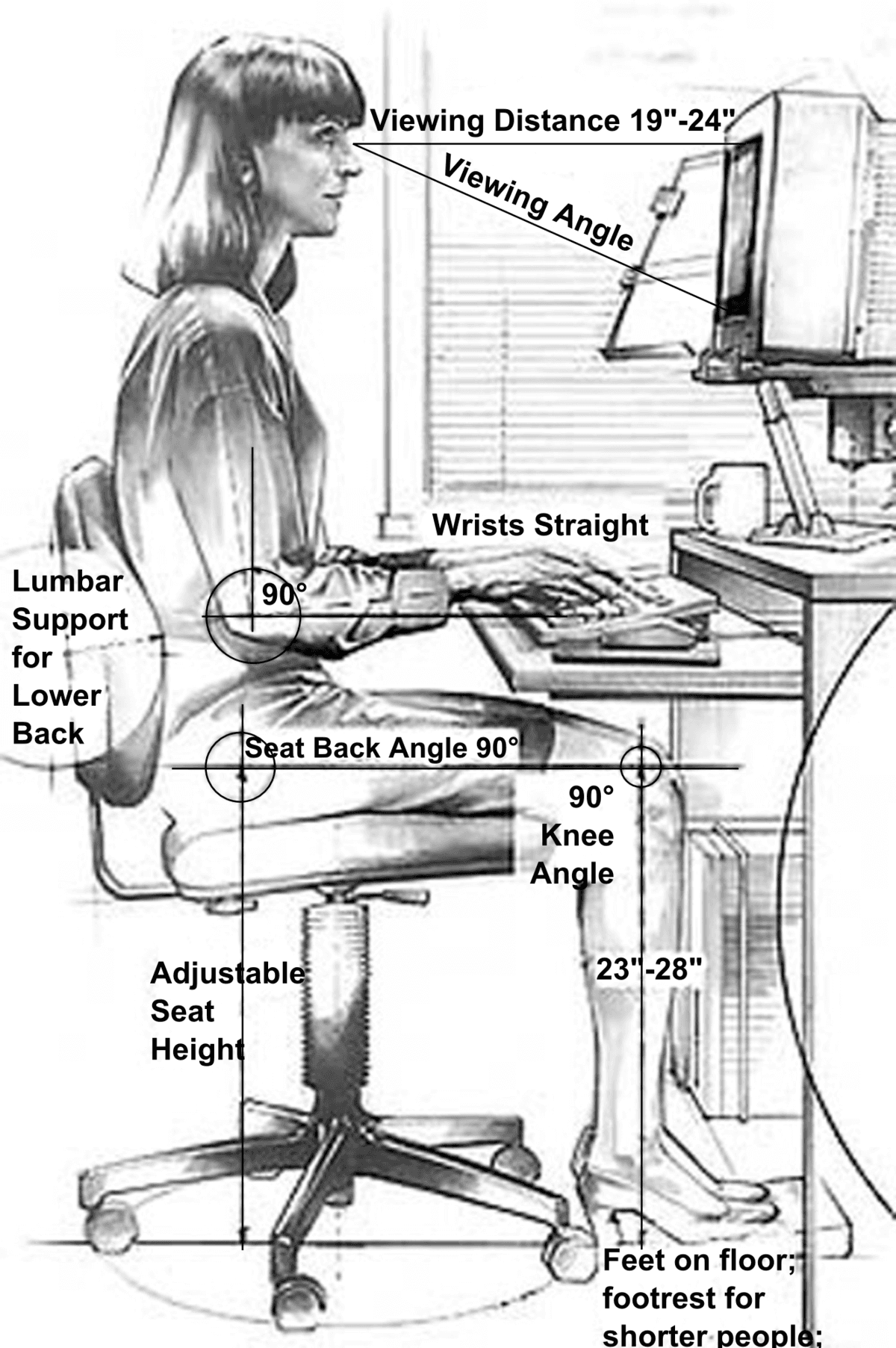
- Desk and chair setup: Adjustable desk heights paired with ergonomic chairs that support the lumbar spine. Elbows should rest at roughly 90 degrees when typing, and feet should be flat on the floor or on a footrest.
- Computer workstation layout: The monitor should be about an arm's length away (roughly 50-70 cm), with the top of the screen at or just below eye level. The keyboard and mouse should be at elbow height to keep wrists neutral.
- Standing workstations: These should include anti-fatigue mats and footrests. Alternating between sitting and standing throughout the day is more effective than standing all day.
- Tool placement: Frequently used items belong in the primary reach zone (the arc your hands can reach without stretching or leaning). Less frequently used items can go in the secondary zone. Pegboards and organized storage reduce awkward reaching.
- Lighting: Task lighting supplements ambient lighting for detail work. Glare reduction strategies, like matte screen finishes and adjustable blinds, prevent eye strain.
Tool and Equipment Design
Well-designed tools reduce the physical cost of work:
- Hand tools with contoured handles and pistol-grip orientations keep wrists neutral and reduce grip force. A bent-handle pliers design, for example, eliminates the need to twist the wrist.
- Material handling aids like lift assists, conveyors, and pallet jacks minimize manual lifting. If a task regularly requires lifting more than the NIOSH recommended weight limit, mechanical assistance should be introduced.
- PPE needs to balance protection with comfort. Lightweight hard hats and breathable safety gloves are more likely to be worn consistently.
- Adjustable equipment with telescoping handles or interchangeable grips fits a wider range of users across the 5th-to-95th percentile range.
- Displays and controls should use large, high-contrast text and provide tactile feedback on buttons so operators can confirm inputs without looking away from their task.
Work Organization and Task Design
Ergonomic design extends beyond physical equipment to how work itself is structured:
- Job rotation reduces cumulative exposure to any single repetitive task or static posture. Workers on an assembly line might alternate between stations every two hours.
- Micro-breaks and work-rest schedules prevent fatigue buildup. Even brief 30-second stretch breaks every 20-30 minutes can significantly reduce discomfort during computer work.
- Pacing should be set to prevent overexertion. Workers need adequate recovery time between physically demanding tasks.
- Task variety mixes different physical and cognitive demands throughout the day, preventing any one body area from being overloaded.
- Participatory ergonomics involves workers directly in identifying problems and developing solutions. Workers who perform the tasks daily often have the best insights into what needs to change, and their buy-in makes interventions more likely to succeed.
Evaluating Ergonomic Interventions
Assessment Techniques
After implementing an ergonomic change, you need to measure whether it actually worked. A solid evaluation typically includes:
- Pre- and post-intervention comparisons of risk factor scores (like RULA or REBA ratings) and performance metrics. Collecting baseline data before the change is critical; without it, you can't quantify improvement.
- Objective measures such as productivity data, error rates, and absenteeism records
- Subjective measures like comfort rating surveys and worker satisfaction questionnaires
- Cost-benefit analysis comparing implementation costs against savings from productivity gains, reduced injury claims, and lower turnover
- Longitudinal tracking to evaluate long-term effects on musculoskeletal health, since some benefits (or problems) only become apparent over months or years
Performance Indicators
Key Performance Indicators (KPIs) help track whether interventions are succeeding over time:
- A reduction in reported musculoskeletal discomfort suggests improved ergonomic conditions
- Improved posture scores on RULA/REBA assessments confirm that workstation redesigns are effective
- Decreased error rates and increased productivity indicate that the work system better supports human performance
- Fewer workers' compensation claims and lower absenteeism reflect improved workplace safety and health
No single metric tells the whole story. Effective evaluation combines multiple indicators to build a complete picture. Track both leading indicators (discomfort reports, posture scores) and lagging indicators (injury rates, compensation claims) for the most accurate view.
Continuous Improvement Strategies
Ergonomic design is never truly "finished." Conditions change as tasks evolve, equipment ages, and workforce demographics shift.
- Regular reassessments catch new or emerging issues before they cause injuries. Many organizations schedule these annually or whenever a process changes significantly.
- Feedback loops keep worker input flowing into the design process so solutions stay relevant.
- Technology integration is expanding what's possible. Wearable sensors can track posture in real time, and software tools can flag risky movement patterns before injuries develop.
- Benchmarking against industry best practices helps identify gaps and set improvement targets.
- Participatory approaches remain central. Interventions developed with worker involvement tend to be more effective and more widely accepted than top-down solutions.
See Fiveable more often in Google
Mark Fiveable as a preferred source and Google is more likely to show you our guides in Top Stories, with a "preferred" badge in AI Mode and AI Overviews.