14.3 Programmable Logic Controllers (PLCs)

🏭Intro to Industrial Engineering Unit 14 Review
14.3 Programmable Logic Controllers (PLCs)
🏭 Intro to Industrial Engineering
Programmable Logic Controllers (PLCs) are specialized digital computers designed to automate industrial processes. They read inputs from sensors and switches, execute a stored program, and drive outputs like motors and valves, all in a continuous loop. Nearly every modern factory floor relies on PLCs for reliable, real-time control, making them one of the most important topics in industrial automation.
PLC Architecture and Function

Top images from around the web for Core Components and Operation
Programmable logic controller - Wikipedia View original
Is this image relevant?
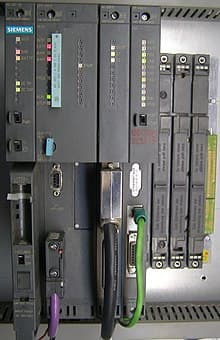
Programmable logic controller - Wikipedia View original
Is this image relevant?
Programmable logic controller - Wikipedia View original
Is this image relevant?
Programmable logic controller - Wikipedia View original
Is this image relevant?
Programmable logic controller - Wikipedia View original
Is this image relevant?
Core Components and Operation
A PLC has five main components working together:
- Input modules receive signals from the physical world (sensors, switches, transducers)
- Output modules send commands to actuators (relays, motor starters, solenoid valves)
- CPU (Central Processing Unit) executes the stored control program
- Memory stores the program, data tables, and configuration settings
- Power supply converts facility power to the voltages the PLC needs internally
These components are housed in rugged, enclosed packaging built for harsh industrial environments. PLCs handle temperature swings, vibration, and electrical noise that would damage a standard desktop computer.
The Scan Cycle is how a PLC actually runs. It repeats continuously, typically completing in milliseconds:
- Read inputs — The CPU captures the current state of all input devices and copies them into an input image table in memory.
- Execute program — The CPU processes the control logic using that snapshot of input data (not live inputs, which is an important distinction for understanding timing behavior).
- Update outputs — The CPU writes results to the output modules, turning devices on or off.
- Housekeeping — The CPU handles internal diagnostics, communication tasks, and memory management.
A faster scan time means the PLC responds more quickly to changing conditions on the factory floor. Typical scan times range from 1 to 25 milliseconds depending on program size and CPU speed.
Input/Output Devices and Modularity
Input devices tell the PLC what's happening in the process. Common examples include proximity sensors (detecting whether a part is present), temperature sensors, limit switches (detecting physical position), pressure switches, and flow or level transducers.
Output devices are what the PLC controls. These include relays (switching circuits on/off), motor starters (running conveyor belts or pumps), and solenoid valves (directing fluid or air flow).
PLCs use a modular design, which is one of their biggest practical advantages:
- You can add or remove I/O modules as your automation needs change
- You can upgrade the CPU or expand memory without replacing the entire system
- Different module types (digital, analog, specialty) can be mixed on the same rack
This modularity means a single PLC platform can scale from a small machine control application to a large process line. For example, a packaging machine might start with 16 digital inputs and 8 digital outputs, then later add an analog input module when a temperature sensor is needed.
Advanced Features
Modern PLCs go well beyond simple on/off control:
- Networking capabilities allow PLCs to communicate across an entire plant using protocols like Ethernet/IP, Profibus, or Modbus. This connects them to other PLCs, supervisory systems, and enterprise networks.
- Data logging lets the PLC record production data, alarm history, and performance metrics for later analysis and troubleshooting.
- Human-Machine Interfaces (HMIs) provide operators with visual displays of the process. These can be touchscreen panels mounted near the machine, dedicated push-button panels, or PC-based software interfaces. The HMI is how operators monitor what's happening and make manual adjustments.
PLC Programming Concepts

Programming Languages
The IEC 61131-3 standard defines five programming languages for PLCs. Each has different strengths, and the choice depends on the application and the programmer's background.
Ladder Logic Diagram (LD) is the most widely used PLC language. It's based on the old relay logic schematics that electricians already understood, which made the transition to PLCs much smoother. Programs are drawn as rungs on a ladder, using graphical symbols for contacts (inputs), coils (outputs), and function blocks (timers, counters, math). If you learn only one PLC language, this is the one.
Function Block Diagram (FBD) is another graphical language. It represents operations as interconnected blocks, where each block performs a function (AND, OR, timer, counter, PID, etc.) and passes data from its output to the next block's input. FBD works well for continuous process control and signal flow applications.
Structured Text (ST) is a high-level, text-based language similar to Pascal. It supports loops, conditional statements (IF/THEN/ELSE), and complex mathematical operations. ST is the go-to choice when you need to implement algorithms or heavy data manipulation that would be awkward to draw in ladder logic.
Sequential Function Charts (SFC) break a process down into discrete steps, transitions between steps, and actions within each step. SFC is ideal for batch processes and state machines where the system moves through a defined sequence, like a chemical mixing process that must heat, hold, cool, and drain in order.
Instruction List (IL) is a low-level, text-based language similar to assembly code. It's compact and efficient for simple, repetitive tasks on resource-constrained PLCs, but it's harder to read and debug than the other languages. IL is rarely used in new designs and has been deprecated in newer revisions of the IEC 61131-3 standard.
Data Types and Program Organization
PLC programs work with several standard data types:
- Boolean — TRUE/FALSE values, used for digital I/O (is the switch on or off?)
- Integer — Whole numbers, used for counters, timers, and discrete quantities
- Floating-point — Decimal numbers, used for analog values like temperature readings or flow rates
- String — Text data, used for HMI displays and communication messages
Programs are organized into units that keep the logic manageable:
- Main programs contain the primary control logic that runs every scan cycle
- Subroutines are reusable code blocks you can call from the main program or from other subroutines, reducing duplication
- Interrupt routines handle time-critical or event-driven tasks that can't wait for the normal scan cycle. For example, an emergency stop input might trigger an interrupt routine that immediately de-energizes all outputs, rather than waiting for the current scan to finish.
PLC Programming Applications
Basic Control and Logic Operations
Ladder logic programs are built from a few fundamental elements:
- Normally open (NO) contacts represent an input condition that must be TRUE to pass power through the rung
- Normally closed (NC) contacts represent an input condition that must be FALSE to pass power
- Coils represent output actions that activate when the rung logic evaluates to TRUE
- Timers introduce time delays. An on-delay timer (TON) waits a set duration before activating; an off-delay timer (TOF) keeps an output active for a set duration after the input drops.
- Counters track how many times an event occurs. Up counters (CTU) increment, down counters (CTD) decrement, and cascading counters chain together for larger count ranges.
Two important applications of basic logic:
Interlocking prevents conflicting actions. For example, a motor that can run forward or reverse needs interlocking logic so both directions can't be energized simultaneously, which would damage the motor. You'd program this by placing a normally closed contact of the "Forward" output on the "Reverse" rung, and vice versa.
Sequencing ensures process steps happen in the correct order. A conveyor system might require a part to be detected at station 1 before the clamp at station 2 activates.
Mathematical and logical operations let the PLC perform process calculations (converting a raw 4-20 mA sensor signal to engineering units like degrees Celsius, for instance) and make decisions based on multiple input conditions.

Advanced Control Techniques
PID control is used when you need precise, continuous regulation of a process variable like temperature, pressure, or flow rate. The PID algorithm calculates an output based on three terms:
- Proportional (P) — Reacts to the current error (difference between setpoint and actual value). Larger error produces a larger correction.
- Integral (I) — Accounts for accumulated past error to eliminate steady-state offset. Without this term, the process might settle slightly above or below the setpoint.
- Derivative (D) — Responds to the rate of change of error to reduce overshoot. It acts as a brake when the process variable is approaching the setpoint quickly.
Tuning the PID parameters (the gains for each term) is critical. Poorly tuned loops oscillate, respond too slowly, or overshoot the setpoint.
Data acquisition and logging systems use PLC memory to store historical process data. Communication protocols then transfer this data to databases or SCADA (Supervisory Control and Data Acquisition) systems for trending, reporting, and long-term analysis.
Alarm and event handling routines manage abnormal conditions. The PLC monitors for situations like high temperature, low pressure, or sensor failures, then triggers appropriate responses: alerting operators, shutting down equipment safely, or switching to backup systems.
Human-Machine Interface Development
HMI screens are the operator's window into the process. Developing effective HMIs involves:
- Creating intuitive displays that show process status at a glance (tank levels, motor states, temperatures)
- Designing control interfaces for manual interventions (start/stop buttons, setpoint adjustments)
- Implementing security features like user authentication and access levels so only authorized personnel can change critical parameters
PLC Troubleshooting
Diagnostic Tools and Techniques
When something goes wrong, PLCs offer several built-in tools to help you find the problem:
- LED status lights on the PLC and I/O modules indicate power status, run/stop mode, and fault conditions. These are your first visual check.
- Error codes displayed on the PLC or read through programming software identify specific faults (memory errors, I/O failures, communication timeouts).
For deeper investigation, programming software provides powerful online tools:
- Online monitoring lets you watch the program execute in real time, showing which contacts are energized and which coils are active.
- Forcing I/O points lets you manually override an input or output to isolate whether the problem is in the field device, the wiring, or the program logic. Use forcing carefully since it bypasses normal safety logic.
- Breakpoints pause program execution at a specific rung or instruction so you can examine the state of all variables at that moment.
- Single-step execution advances the program one instruction at a time for detailed logic analysis.
- Watch windows let you monitor specific variable values in real time without scrolling through the entire program.
Common Issues and Resolution Strategies
Timing issues are among the most common PLC problems. Race conditions occur when the outcome of the logic depends on which instruction executes first within a scan. If two rungs both try to control the same output, the rung that executes last "wins" because the output image table gets overwritten. Reorganizing rung order or using intermediate flags can fix this. Critical path analysis helps you identify where scan time is being consumed if the program runs too slowly.
Network communication problems can disrupt an entire system. Start by verifying that communication parameters (baud rate, node address, IP settings) match on both ends. Protocol-specific diagnostic tools like Modbus scanners or Profibus testers can identify where messages are failing.
Systematic fault-finding follows a logical sequence:
- Check power supplies for proper voltage levels
- Inspect I/O modules for LED indicators showing faults, loose connections, or blown fuses
- Test field wiring for continuity and proper termination
- Use online monitoring to verify the program is receiving expected input states
- Review recent program changes that might have introduced the fault
Maintenance and Recovery Strategies
Losing a PLC program with no backup can shut down a production line for days. Prevention is straightforward:
- Back up programs regularly, including configuration files and HMI screens
- Use version control to document every change and maintain a revision history so you can roll back if a change causes problems
- Keep recovery procedures documented with step-by-step instructions for restoring a PLC from backup
- Maintain a spare parts inventory for critical components (CPU modules, power supplies, commonly used I/O cards) so a hardware failure doesn't become a long outage
See Fiveable more often in Google
Mark Fiveable as a preferred source and Google is more likely to show you our guides in Top Stories, with a "preferred" badge in AI Mode and AI Overviews.