14.3 Data Literacy and Information Visualization

📲Media Literacy Unit 14 Review
14.3 Data Literacy and Information Visualization
📲 Media Literacy
Data Literacy and Information Visualization
Data literacy is the ability to read, understand, create, and communicate data as information. In a world where charts, statistics, and dashboards show up everywhere from news articles to job reports, knowing how to work with data is a core media literacy skill. This section covers what data literacy means, the most common types of visualizations, and how to both evaluate and create effective data visuals.

Top images from around the web for Data literacy in information age
Critical Thinking | College Composition View original
Is this image relevant?
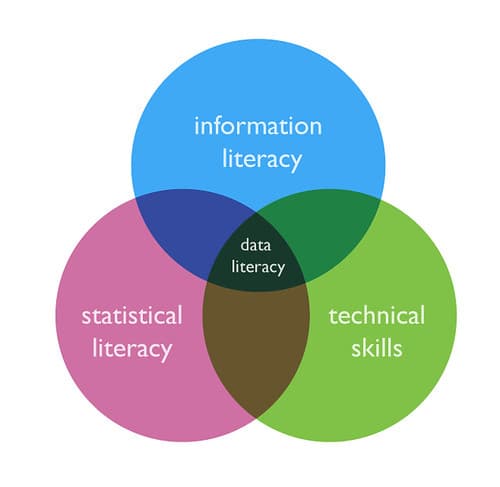
What is data literacy? (1/6) | intersection of information l… | Flickr View original
Is this image relevant?
Progressive Charlestown: Decision making in action View original
Is this image relevant?
Critical Thinking | College Composition View original
Is this image relevant?
What is data literacy? (1/6) | intersection of information l… | Flickr View original
Is this image relevant?
Data Literacy in the Information Age
Data literacy goes beyond just reading numbers. It means you can ask meaningful questions using data, interpret what the answers show, and explain your findings to others. That's the foundation of data-driven decision making.
Why does this matter now more than ever? The amount of data generated globally is growing at an exponential rate. Employers across industries need people who can work with data:
- Marketing teams analyze customer behavior data to target campaigns
- Healthcare professionals use patient data to identify treatment patterns and public health trends
- Finance analysts interpret market data to guide investment decisions
Strong data literacy also sharpens your critical thinking. When you can look at a dataset and evaluate whether the conclusions drawn from it actually hold up, you're much harder to mislead.

Types of Data Representations
Different types of data call for different visual formats. Picking the wrong one can confuse your audience or hide the real story in the numbers.
Charts and graphs are the most common formats:
- Bar charts compare categories or discrete values. For example, a bar chart could show total sales for each product in a store, making it easy to see which product sells best.
- Line charts show trends or changes over time. Think of a line tracking a company's stock price over 12 months or daily website traffic over a week.
- Pie charts represent proportions of a whole. They work well for showing something like market share split among three or four competitors, but they get hard to read with too many slices.
- Scatter plots display the relationship between two continuous variables. Plotting income against education level, for instance, can reveal whether a correlation exists between the two.
Infographics combine graphics, text, and images to convey complex ideas quickly. You'll see these in public health campaigns, social media explainers, and news summaries. Their strength is accessibility, but they can oversimplify if not done carefully.
Dashboards pull together multiple visualizations into one view, giving an overview of key metrics at a glance. Businesses use dashboards to monitor performance indicators like revenue, customer acquisition, and website analytics in real time.
Maps represent geographical data and come in a few varieties:
- Choropleth maps use color or shading to show how a value differs across regions. A map shading U.S. states by median household income is a classic example.
- Heat maps display the density or concentration of data points in a space. These are used for things like mapping crime hotspots in a city or showing where users click most on a webpage.

Evaluating the Effectiveness of Visualizations
Not all visualizations are created equal. When you're assessing whether a data visual actually works, look for these qualities:
- Clarity: Does the visualization convey its main message quickly? Good visuals aren't cluttered with unnecessary labels, decorative elements, or extra data that distracts from the point.
- Appropriate format: Is the chart type a good fit for the data? A pie chart with 15 slices, for instance, is almost impossible to read. A line chart would be a poor choice for comparing unrelated categories.
- Accurate representation: Does the visual faithfully represent the underlying data? Watch for truncated axes, misleading scales, or cherry-picked time ranges. A bar chart where the y-axis starts at 95 instead of 0 can make a tiny difference look enormous.
- Consistent design: Are colors, fonts, and layouts used in a way that helps rather than hinders understanding? Good design choices guide the viewer's eye to what matters most.
Creating Data Visualizations
Building an effective visualization is a process, not a one-step task. Here's how to approach it:
- Define your purpose and audience. What's the key message or insight you want to convey? A visualization for a general audience needs to be simpler and more intuitive than one built for analysts who work with data daily.
- Gather and preprocess your data. Collect information from reliable sources. Then clean it up: remove duplicates, handle missing values, filter out irrelevant entries, and transform the data into a usable format.
- Choose the right visualization type. Match the format to both your data and your message. If you're showing change over time, reach for a line chart. If you're comparing parts of a whole, consider a pie chart or stacked bar chart. Refer back to the types above and weigh each format's strengths and limitations.
- Design and refine. Apply clear colors, readable fonts, and a logical layout. Then iterate: share a draft with someone, get feedback, and revise. The first version is rarely the best one.
Common tools for creating visualizations include:
- Spreadsheet software (Microsoft Excel, Google Sheets) for basic charts and graphs
- Business intelligence tools (Tableau, Power BI) for interactive dashboards and more advanced visuals
- Programming libraries (Matplotlib for Python, D3.js for JavaScript) for highly customized or web-based visualizations
See Fiveable more often in Google
Mark Fiveable as a preferred source and Google is more likely to show you our guides in Top Stories, with a "preferred" badge in AI Mode and AI Overviews.