10.1 Internet Architecture and Web Technologies

📲Media Literacy Unit 10 Review
10.1 Internet Architecture and Web Technologies
📲 Media Literacy
Internet Architecture
The internet works through a layered system where each layer has a specific job. Understanding these layers helps you see how data actually moves from one device to another, and why things like slow loading or broken connections happen.

Top images from around the web for Components of internet architecture
The OSI Reference Model | CCNAX 200-120 View original
Is this image relevant?
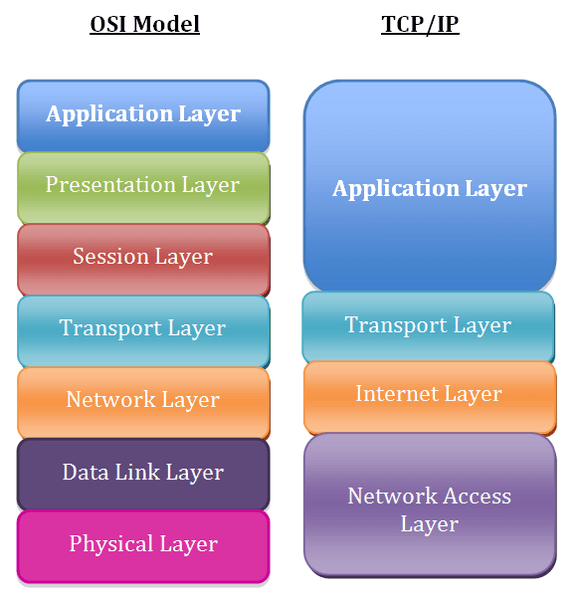
The OSI Model and TCP/IP | Ivy Tech College Success 115 View original
Is this image relevant?
Internet Architecture ; Erik Wilde ; UC Berkeley School of Information View original
Is this image relevant?
The OSI Reference Model | CCNAX 200-120 View original
Is this image relevant?
The OSI Model and TCP/IP | Ivy Tech College Success 115 View original
Is this image relevant?
Components of Internet Architecture
The internet's design follows a layered model. Each layer communicates with the layers directly above and below it, and each one handles a distinct part of the process.
- Application layer sits at the top, where your apps interact with the network. Protocols here include HTTP (web browsing), FTP (file transfer), SMTP (email), and DNS (translating domain names like "google.com" into IP addresses).
- Transport layer manages end-to-end communication between devices. TCP is reliable and connection-oriented, meaning it confirms data arrived correctly. UDP is faster but doesn't guarantee delivery, which is why it's used for things like video streaming where speed matters more than perfection.
- Network layer routes packets across networks. IP handles addressing and routing, ICMP reports errors (like when a destination is unreachable), and IGMP manages multicast group communication.
- Data link layer handles communication between directly connected nodes within a single network. Ethernet covers wired LANs, Wi-Fi covers wireless LANs, and PPP handles point-to-point connections.
- Physical layer defines the actual hardware: cables (coaxial, fiber optic), connectors (RJ45, SC), and signal specifications like voltage levels and modulation schemes.

Data Transmission via Internet Protocols
When you send data over the internet, it doesn't travel as one big chunk. Instead, it gets broken into smaller packets, and each packet finds its own way to the destination.
Here's how the process works:
- Data is divided into smaller packets for efficient transmission.
- Each packet is labeled with source and destination IP addresses so the network knows where it came from and where it's going.
- Packets are routed independently through the network, meaning two packets from the same message might take completely different paths.
- TCP establishes a connection between sender and receiver before transmission begins. It uses sequence numbers and acknowledgments to confirm each packet arrived, and retransmits any that were lost or corrupted.
- IP handles the actual routing. Each router a packet hits checks its destination address, consults its routing table, and forwards the packet to the next hop. Routers use protocols like OSPF and BGP to keep their routing tables updated.
The result: even if individual packets take different routes or arrive out of order, TCP reassembles them correctly on the receiving end.

Web Technologies
Web Technologies: HTML, CSS, JavaScript
Three core technologies power nearly every website you visit. Each one handles a different aspect of the experience.
HTML (Hypertext Markup Language) defines the structure and content of a web page. It uses tags to create elements like headings (<h1>), paragraphs (<p>), and links (<a>). Think of HTML as the skeleton of a page: it determines what content exists and how it's organized.
CSS (Cascading Style Sheets) controls how that content looks. CSS handles layout (positioning, margins), colors (text and background), and fonts (family, size). Without CSS, every website would look like a plain text document with blue links.
JavaScript is a full programming language that adds behavior and interactivity. It enables things like form validation (checking that you entered a valid email before submitting), content updates without reloading the page (using a technique called AJAX), and complex single-page applications like Gmail or Google Maps.
A key distinction: HTML and CSS are declarative languages that describe what should appear and how it should look. JavaScript is a programming language that defines what should happen in response to user actions or other events.
Impact of Web Standards
Web standards are guidelines defined by organizations like the W3C (World Wide Web Consortium) that establish how HTML, CSS, and other web technologies should work. Without them, every browser would interpret code differently, and the web would be a mess.
Benefits of adhering to web standards:
- Improved accessibility for users with disabilities. Semantic HTML tags like
<nav>and<article>give meaning to page structure, and ARIA attributes help assistive technologies (screen readers, braille displays) interpret content correctly. - Cross-browser compatibility ensures that a site renders and functions consistently across Chrome, Firefox, Safari, and on both desktop and mobile devices.
- Easier maintenance because standardized code is more readable, reusable, and less likely to break as browsers update.
The WCAG (Web Content Accessibility Guidelines) are a specific set of standards focused on accessibility. They include recommendations like providing sufficient color contrast between text and background, supporting full keyboard navigation for users who can't use a mouse, and including alternative text for images so screen readers can describe them.
See Fiveable more often in Google
Mark Fiveable as a preferred source and Google is more likely to show you our guides in Top Stories, with a "preferred" badge in AI Mode and AI Overviews.