9.1 Educational Technology Tools and Resources

📅Curriculum Development Unit 9 Review
9.1 Educational Technology Tools and Resources
📅 Curriculum Development
Educational Technology Tools and Resources
Educational technology tools give curriculum designers concrete ways to support learning objectives through digital platforms, interactive media, and data-driven personalization. Understanding what's available, how to evaluate it, and how to integrate it thoughtfully is central to modern curriculum development.
This section covers the major categories of ed-tech tools, criteria for evaluating their effectiveness, strategies for integrating them into curriculum, and the trade-offs that come with classroom technology use.

Top images from around the web for Educational technology tools and resources
Three Pillars of Educational Technology | Welcome to TeachOnline View original
Is this image relevant?
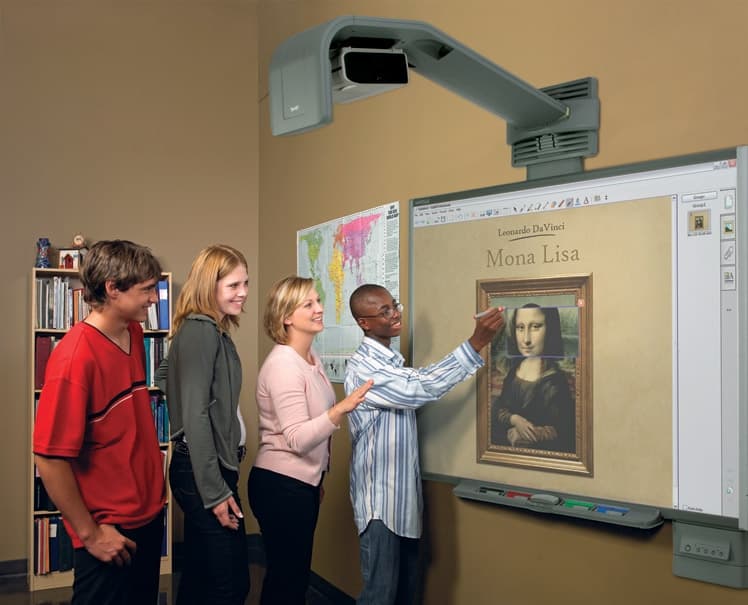
edts523Naz - Interactive Whiteboards in Education View original
Is this image relevant?
Why OER? – Open Educational Resources: Basics & Beyond View original
Is this image relevant?
Three Pillars of Educational Technology | Welcome to TeachOnline View original
Is this image relevant?
edts523Naz - Interactive Whiteboards in Education View original
Is this image relevant?
Educational Technology Tools and Resources
Ed-tech tools fall into several broad categories, each serving a different instructional purpose. Knowing what each category does helps you match tools to specific curriculum goals rather than adopting technology for its own sake.
Learning Management Systems (LMS) are platforms for organizing, delivering, and tracking course content. Examples include Canvas, Moodle, Blackboard, and Google Classroom. These serve as the central hub where students access materials, submit work, and receive feedback.
Interactive whiteboards (such as SMART Board and Promethean ActivBoard) allow teachers to deliver dynamic presentations and facilitate whole-class collaboration with touch-based interaction.
Student response systems gather real-time feedback during instruction. Tools like Kahoot!, Socrative, Mentimeter, and Plickers let teachers quickly gauge understanding and adjust pacing on the fly.
Educational apps and subject-specific software target particular content areas. Duolingo supports language acquisition, GeoGebra provides interactive math visualization, and Quizlet offers flashcard-based study tools.
Virtual and augmented reality tools create immersive learning experiences. Google Expeditions can take students on virtual field trips, Nearpod VR embeds VR within lessons, and Merge Cube lets students manipulate 3D objects in their hands.
Open Educational Resources (OER) are freely accessible, openly licensed materials. Khan Academy, CK-12 Foundation, and OpenStax provide high-quality content at no cost, which matters for equity and budget-conscious curriculum planning.
Collaborative tools facilitate group work and communication. Google Docs enables real-time co-authoring, while platforms like Microsoft Teams, Slack, and Padlet support discussion and project coordination.
Multimedia creation tools let students and teachers produce videos, podcasts, and visual content. Examples include iMovie, Audacity, WeVideo, and Adobe Express (formerly Adobe Spark).
Adaptive learning platforms use algorithms to personalize content based on individual student performance. DreamBox Learning adjusts math instruction in real time, while platforms like Knewton and ScootPad modify difficulty and pacing automatically.
Gamification tools incorporate game design elements to boost engagement. Classcraft layers role-playing mechanics onto classroom behavior, Prodigy Math Game embeds math practice in a game world, and CodeCombat teaches programming through gameplay.
Learning analytics tools collect and analyze student data to surface patterns in performance and engagement. Platforms like Tableau, Schoolzilla, and Brightspace Insights help educators make data-informed curriculum decisions.

Evaluating Technology for Learning
Not every tool belongs in every curriculum. These criteria provide a structured framework for deciding whether a particular technology is worth adopting.
- Alignment with learning goals — Does the tool directly support the desired learning outcomes? Is it age-appropriate and matched to students' current skill levels?
- Engagement and interactivity — Does it actively involve students in learning, or is it just a digital version of a worksheet? Look for tools that promote collaboration, problem-solving, and critical thinking.
- Accessibility and inclusivity — Is the tool compatible with assistive technologies (screen readers, captioning)? Can it accommodate diverse learning needs and reduce barriers to equitable access?
- Data privacy and security — What data does the tool collect, and how is it stored? Compliance with regulations like FERPA (which protects student education records) and COPPA (which protects children's online privacy) is non-negotiable.
- Ease of use and technical requirements — Consider the learning curve for both teachers and students. What hardware, software, and internet bandwidth does the tool require?
- Alignment with curriculum standards — Does the tool support local, state, or national standards? A flashy tool that doesn't connect to required competencies has limited curricular value.
- Evidence of effectiveness — Are there research studies or case studies showing measurable impact on student outcomes? Consider the quality and relevance of that evidence, not just vendor claims.
- Customization and adaptability — Can you modify content, adjust difficulty, or integrate the tool with other platforms? Rigid tools are harder to fit into diverse curricular contexts.
- Cost and sustainability — Factor in licensing fees, subscriptions, hardware needs, and ongoing maintenance. A tool that's affordable for one classroom may not scale across a district.
- Professional development and support — Does the vendor offer training resources? Is technical support responsive? Teachers need adequate preparation to use any tool effectively.

Strategies for Technology Integration
Successful integration is a deliberate process, not a matter of simply handing students a device. These steps move from planning through implementation to evaluation.
-
Define learning objectives first. Clearly identify the goals of the lesson or unit and the specific skills or knowledge students should develop. The technology should serve these objectives, not the other way around.
-
Match tools to instructional strategies. Select tools that complement your chosen approach, whether that's direct instruction, inquiry-based learning, or project-based learning. Consider how the tool will support content delivery, student practice, and assessment.
-
Plan scaffolding and support. Introduce the tool gradually. Provide tutorials, troubleshooting guides, and structured practice time. Anticipate where students (and teachers) are likely to get stuck.
-
Build in formative and summative assessment. Use technology-based assessments to monitor progress and provide timely feedback. Let the data you collect inform how you adjust instruction and tool usage.
-
Design for student-centered learning. Create activities where students actively engage with the tool and take ownership of their learning. Prioritize tasks that require collaboration, creativity, and problem-solving over passive consumption.
-
Collaborate with colleagues and stakeholders. Consult fellow teachers, curriculum specialists, and technology coaches for recommendations. Gather input from students and parents about their needs and concerns.
-
Pilot before scaling. Test the tool in a single class or unit first. Collect feedback, identify problems, and make adjustments before rolling it out more broadly.
-
Check compatibility with existing infrastructure. Evaluate how the tool integrates with current hardware, software, and network capacity. A tool that conflicts with existing platforms creates more problems than it solves.
-
Provide ongoing professional development. Plan initial training and continued learning opportunities for teachers. Establish peer support systems for sharing best practices and troubleshooting.
-
Monitor and evaluate continuously. Regularly analyze data on student outcomes and engagement. Use findings to decide whether to continue, modify, or replace the tool.
Benefits vs. Challenges of Classroom Technology
Technology integration involves real trade-offs. Curriculum developers need to weigh both sides honestly.
Benefits:
- Increased student engagement and motivation through interactive, varied learning experiences
- Enhanced differentiation and personalized learning pathways
- Broader access to diverse resources and perspectives beyond the textbook
- Development of 21st-century skills, including digital literacy, critical thinking, and collaboration
- Expanded capacity for distance and hybrid learning models
- Opportunities for authentic, real-world application of knowledge
- Greater efficiency in data collection, analysis, and communication
- Improved collaboration among students, teachers, and parents
- Preparation for future careers in a digital economy
- Potential cost savings through digital resources and reduced paper use
Challenges:
- The digital divide: unequal access to devices, internet, and technical support across communities
- Ongoing need for professional development so teachers can use tools effectively
- Risk of technology becoming a distraction or being used inappropriately
- Concerns about excessive screen time and its effects on student well-being
- Rapidly evolving technology that can create compatibility and obsolescence issues
- Teaching responsible digital citizenship, including addressing cyberbullying and online safety
- Balancing technology use with non-digital skills and face-to-face interaction
- Complexity of managing and maintaining multiple tools and systems simultaneously
- Overcoming resistance to change among teachers, administrators, or parents
The goal isn't to adopt as much technology as possible. It's to select and integrate tools that genuinely strengthen curriculum and improve student learning outcomes, while honestly addressing the barriers that come with implementation.
See Fiveable more often in Google
Mark Fiveable as a preferred source and Google is more likely to show you our guides in Top Stories, with a "preferred" badge in AI Mode and AI Overviews.