
Exception handling in Python lets programs respond to errors without stopping abruptly. With try, except, else, and finally, you can handle missing files, invalid indexes, and other problems in a controlled way.
This section covers common file-related exceptions, try/except blocks for built-in exceptions, and advanced techniques for writing more reliable Python programs.
Exception Handling in Python
Common file reading exceptions
- FileNotFoundError raised when attempting to open a non-existent or inaccessible file (incorrect file path or deleted file)
- IndexError raised when trying to access an out-of-range index for a sequence (list, tuple, or string) can occur when iterating over lines in a file and attempting to access an index beyond the end of the file
Try/except for built-in exceptions
- Try/except statements handle exceptions and prevent program termination
- Code that may raise an exception placed inside the
tryblock - Exception handling code written in the corresponding
exceptblock
- Code that may raise an exception placed inside the
- Syntax:
</>Python
try: # Code that may raise an exception except ExceptionType: # Exception handling code - Multiple
exceptblocks can handle different types of exceptions eachexceptblock specifies the exception type it handles - Optional
elseblock can be added after theexceptblock(s) code in theelseblock executed if no exceptions raised in thetryblock - Optional
finallyblock can be added after theexceptandelseblocks code in thefinallyblock always executed, regardless of whether an exception was raised or not - The
raisekeyword can be used to manually trigger an exception

Error handling for file operations
- Use try/except statements to handle file-related exceptions
- Wrap file operations (opening, reading, writing) inside a
tryblock - Handle specific exceptions (FileNotFoundError, IndexError) in the corresponding
exceptblocks
- Wrap file operations (opening, reading, writing) inside a
- Provide informative error messages to the user
- In the
exceptblock, print a user-friendly error message indicating the nature of the exception - Use the
str()function to convert the exception object to a string for display
- In the
- Close the file in the
finallyblock- Ensure that the file is properly closed, regardless of whether an exception was raised or not
- Use the
close()method to close the file
- Example:
</>Python
try: file = open("data.txt", "r") # File operations (reading, processing) except FileNotFoundError: print("File not found. Please check the file path.") except IndexError: print("Invalid index accessed while reading the file.") finally: file.close()
Advanced Exception Handling
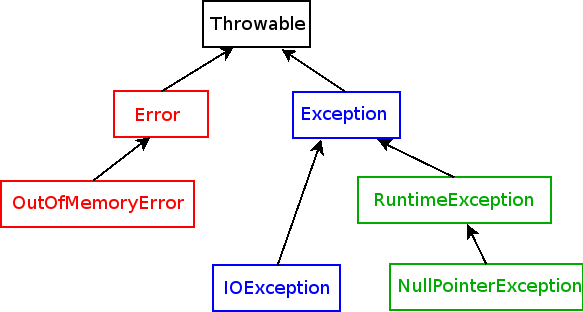
- Exception hierarchy: Python's exceptions are organized in a hierarchical structure, with more specific exceptions inheriting from more general ones
- Custom exceptions: Developers can create their own exception classes by inheriting from built-in exception classes
- Exception chaining: Allows one exception to be raised in response to another, preserving the original exception's traceback
- Traceback: Provides a detailed report of the call stack at the point where an exception occurred, useful for debugging