
Strings in Python let you store and manipulate text. They can be sliced, indexed, and processed with built-in methods, which makes them useful for handling text data in programs.
Special characters and escape sequences add flexibility to string representation. Unicode conversion functions allow working with a wide range of characters, while string operations and formatting techniques enable complex text processing and presentation.
String Manipulation and Special Characters
String character indexing
- Strings are sequences of characters that can be accessed and manipulated using indexing
- Indexing starts at 0 for the first character and increments by 1 for each subsequent character (
string[0]accesses the first character) - Negative indexing starts at -1 for the last character and decrements by 1 for each preceding character (
string[-1]accesses the last character)
- Indexing starts at 0 for the first character and increments by 1 for each subsequent character (
- Individual characters can be accessed using square bracket notation
string[index] - Substrings can be extracted using slicing
string[start:end]startis the index of the first character to include (inclusive)endis the index of the last character to exclude (exclusive)- If
startis omitted, it defaults to the beginning of the string (string[:5]extracts the first 5 characters) - If
endis omitted, it defaults to the end of the string (string[2:]extracts from the 3rd character to the end)
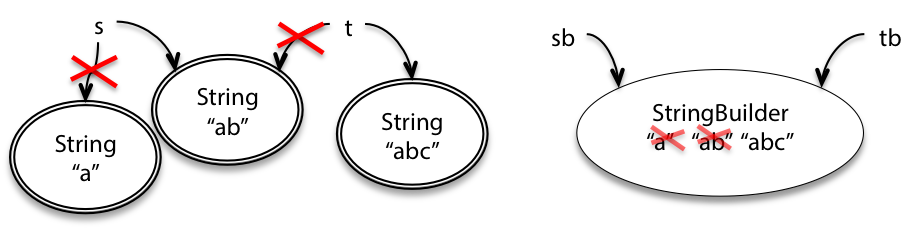
- Strings are immutable, meaning individual characters cannot be directly modified
- To modify a string, create a new string with the desired changes (concatenate, slice, etc.)
Escape sequences in strings
- Escape sequences are used to represent special characters within a string (escape characters)
- Escape sequences start with a backslash
\followed by a specific character or sequence - Common escape sequences include:
\ninserts a newline\tinserts a tab\\inserts a literal backslash\'inserts a single quote\"inserts a double quote
- Escape sequences are treated as a single character within the string
- Raw strings (prefixed with
rorR) treat backslashes as literal characters, ignoring escape sequences (r"C:\newfile"preserves the backslashes)
Unicode conversion functions
- Unicode is a standard for representing a wide range of characters from various scripts and symbols
- Each character is assigned a unique code point, which is an integer value
- The
ord()function takes a single character as an argument and returns its Unicode code pointord('A')returns65ord('€')returns8364
- The
chr()function takes a Unicode code point as an argument and returns the corresponding characterchr(65)returns'A'chr(8364)returns'€'
- These functions allow for conversion between characters and their numerical representations
- Unicode code points can be used for character comparisons and manipulations
ord('A') < ord('B')evaluates toTruechr(ord('A') + 1)returns'B'
String Operations and Formatting
- String operations allow for manipulation and combination of strings
- Concatenation: Joining strings using the
+operator - Repetition: Repeating strings using the
*operator
- Concatenation: Joining strings using the
- String comparison uses relational operators to compare strings lexicographically
<,>,<=,>=,==,!=can be used to compare strings
- String methods provide built-in functionality for string manipulation
- Common methods include
lower(),upper(),strip(),split(),join()
- Common methods include
- String formatting allows for creating formatted strings with placeholders
- F-strings:
f"Hello, {name}!"for inline variable substitution .format()method:"Hello, {}!".format(name)for more complex formatting
- F-strings: