1.8 Smart TVs and internet-connected devices

📺Television Studies Unit 1 Review
1.8 Smart TVs and internet-connected devices
📺 Television Studies
Evolution of smart TVs
Smart TVs merged traditional broadcasting with internet connectivity, turning televisions from passive screens into interactive, app-driven devices. This shift is one of the clearest examples of media convergence in Television Studies, where previously separate technologies (computing, internet, broadcasting) collapsed into a single device.
Precursors to smart TVs
Smart TVs didn't appear out of nowhere. Several earlier technologies proved that people wanted internet-connected content on their TV screens:
- WebTV (1996) was one of the first attempts to bring basic internet browsing to television sets, though it never gained mass adoption.
- Early DVR services like TiVo and ReplayTV introduced on-demand viewing by letting users record and time-shift content, training audiences to expect control over when they watched.
- Game consoles (PlayStation, Xbox) showed that living room devices could connect to the internet for more than just gaming, including video streaming and web browsing.
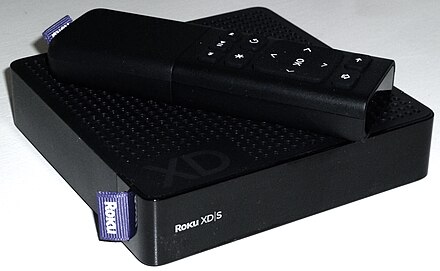
- Streaming set-top boxes like Apple TV and Roku brought app-based streaming to existing TVs, essentially making any TV "smart" without a built-in operating system.
These devices collectively built the consumer expectation that a TV should do more than receive broadcast signals.
Key technological advancements
Several technical developments had to come together before smart TVs became practical:
- Faster processors allowed TVs to run full operating systems, support multitasking, and render complex user interfaces smoothly.
- Broadband internet expansion made streaming high-quality video realistic for everyday households.
- HTML5 and modern web standards replaced older technologies like Flash, enabling better-performing apps directly on TV hardware.
- Display improvements (LED, OLED, QLED) gave viewers a reason to upgrade their sets, and manufacturers bundled smart features into these new panels.
- Voice control and gesture recognition arrived through built-in microphones and sensors, adding new ways to interact beyond the remote.
Market adoption trends
- Early smart TVs were expensive and had limited app libraries, so adoption was slow at first.
- By the mid-2010s, prices dropped significantly and major streaming services (Netflix, Hulu) invested heavily in TV apps, driving rapid growth.
- Today, smart TV functionality is a standard feature in nearly all new television sets, not a premium add-on.
- Adoption rates still vary by region, largely depending on broadband infrastructure and the availability of local streaming content.
Features of smart TVs
Smart TVs integrate internet connectivity and computing power into the television itself, expanding its role well beyond broadcast reception. The feature set of modern smart TVs reflects trends in user interface design, content delivery, and artificial intelligence.
Operating systems and interfaces
Just like smartphones, smart TVs run dedicated operating systems. The major ones you'll encounter are:
- Tizen (Samsung), webOS (LG), Android TV/Google TV (Sony, TCL, and others), and Roku TV (built into several budget and mid-range brands).
- Each OS has its own home screen layout, but they all prioritize content discovery, putting streaming apps and recommendations front and center.
- Most allow home screen customization so users can pin favorite apps and rearrange content rows.
- Features like picture-in-picture and split-screen let viewers multitask, watching a game while checking a streaming queue, for example.
- Regular software updates add features and patch security issues, though update support varies by manufacturer.
Streaming capabilities
Streaming is the core use case for most smart TV owners:
- Popular services like Netflix, Hulu, Amazon Prime Video, and Disney+ come pre-installed or are easily downloaded.
- Casting protocols like Chromecast built-in and AirPlay let users send content from phones or laptops to the TV screen.
- Smart TVs support multiple video codecs (H.264, HEVC, VP9, and increasingly AV1) to handle different streaming formats efficiently.
- Adaptive bitrate streaming automatically adjusts video quality based on your internet speed, preventing buffering during congestion.
- Live TV streaming services (YouTube TV, Sling TV, Hulu + Live TV) sit alongside traditional broadcast inputs, blurring the line between "cable" and "internet" content.
App ecosystems
Smart TVs have their own app stores, and the selection goes beyond video:
- Gaming apps offer casual play without a separate console.
- Productivity tools like web browsers and video conferencing apps (Zoom) bring non-entertainment functions to the big screen.
- Social media apps allow content sharing and browsing.
- Manufacturers provide developer tools and SDKs so third-party developers can build TV-optimized applications, which is why app libraries keep expanding.
Voice control and AI assistants
- Most current smart TVs integrate at least one AI assistant: Google Assistant, Amazon Alexa, or Samsung's Bixby.
- Voice commands handle tasks like searching for content, adjusting volume, switching inputs, and even controlling smart home devices (lights, thermostats).
- Natural language processing improves over time, so the system gets better at understanding conversational requests rather than requiring exact phrases.
- AI also powers content recommendation engines that suggest shows and movies based on your viewing history.
Internet connectivity in TVs
Internet connectivity is what makes a smart TV "smart." Without it, all those apps and streaming services are useless. Understanding the technical side helps explain why some viewers have better experiences than others.
Wi-Fi vs. ethernet connections
- Wi-Fi is the most common connection method. Newer TVs support Wi-Fi 5 (802.11ac) or Wi-Fi 6, which offers faster speeds and better performance on crowded networks.
- Ethernet (a wired connection) provides more stable, consistent speeds and lower latency, making it the better choice for reliable 4K streaming.
- Most smart TVs with dual-band Wi-Fi can connect on either the 2.4GHz band (longer range, slower) or the 5GHz band (shorter range, faster).
- Many models include both Wi-Fi and an ethernet port, giving users the choice.
- Wi-Fi Direct enables peer-to-peer connections between a TV and a mobile device without going through a router.

Bandwidth requirements
Different content quality levels demand different internet speeds:
- Standard HD (1080p) streaming typically requires 5-8 Mbps.
- 4K UHD streaming needs roughly 25 Mbps or more.
- If multiple people in a household are streaming simultaneously, total bandwidth needs multiply accordingly.
- Adaptive bitrate technology automatically lowers resolution during network congestion to prevent buffering.
- Most streaming apps let users manually adjust quality settings to balance picture quality against data usage.
Security concerns
Connecting a TV to the internet introduces real security risks:
- Smart TVs can be vulnerable to hacking and malware, just like any internet-connected device.
- TVs with built-in cameras or microphones create potential for unauthorized surveillance if compromised.
- Data breaches could expose personal information, viewing habits, and even voice recordings.
- Regular firmware updates are the primary defense against known vulnerabilities, but many users never install them.
- Newer models increasingly include secure boot processes and hardware-level security features to reduce risk.
Impact on content consumption
Smart TVs haven't just changed the hardware; they've reshaped how and when people watch television. These shifts have major consequences for content creators, distributors, and advertisers.
Shift from linear to on-demand
- Traditional scheduled ("linear") TV viewing has declined steadily as on-demand options have grown.
- Binge-watching became a cultural norm largely because smart TVs and streaming apps made it effortless to watch an entire season in one sitting.
- Time-shifting means viewers watch what they want, when they want, rather than conforming to a network's schedule.
- The boundary between a "TV channel" and a "streaming platform" has blurred considerably, with many apps offering both live and on-demand content.
- This shift disrupts traditional advertising models, since viewers can skip ads or watch on ad-free tiers.
Personalization and recommendations
- AI-driven recommendation algorithms analyze viewing history to suggest content tailored to individual users.
- User profiles (common on Netflix, Disney+, and others) let multiple household members maintain separate recommendation feeds.
- Cross-platform recommendation systems influence what people discover and watch, giving platforms significant power over content visibility.
- A known downside is the filter bubble effect: algorithms tend to recommend content similar to what you've already watched, potentially limiting exposure to diverse genres or perspectives.
Second screen experiences
- Companion apps on phones and tablets can sync with TV content to provide extra information, polls, or interactive features during a show.
- Social media engagement spikes during live events like sports, award shows, and reality TV finales, creating a shared viewing experience even among geographically separated audiences.
- Advertisers increasingly coordinate messaging across TV and mobile screens simultaneously.
- The challenge for content creators is maintaining viewer attention when audiences are splitting focus between the TV and a phone in their hand.
See Fiveable more often in Google
Mark Fiveable as a preferred source and Google is more likely to show you our guides in Top Stories, with a "preferred" badge in AI Mode and AI Overviews.