
Enterprise Resource Planning (ERP) systems are vital tools in modern business operations. These comprehensive software suites integrate core processes across departments, enhancing efficiency and decision-making in production and operations management.
ERP solutions provide a centralized platform for managing resources and optimizing supply chains. By streamlining workflows and offering real-time data access, ERP systems play a crucial role in effective production planning and control, ultimately improving overall organizational performance.
Overview of ERP systems
- Enterprise Resource Planning (ERP) systems integrate core business processes across departments, enhancing operational efficiency and decision-making in production and operations management
- ERP solutions provide a centralized platform for managing resources, streamlining workflows, and optimizing supply chain operations, crucial for effective production planning and control
Definition and purpose
- Comprehensive software suite integrates diverse business functions into a unified system
- Facilitates real-time data sharing and collaboration across departments (finance, HR, manufacturing, supply chain)
- Streamlines business processes by eliminating data silos and redundant operations
- Enhances decision-making through accurate, up-to-date information from all areas of the organization
Historical development
- Evolved from Material Requirements Planning (MRP) systems in the 1960s
- Expanded to Manufacturing Resource Planning (MRP II) in the 1980s, incorporating additional business functions
- Emerged as ERP in the 1990s, encompassing enterprise-wide integration beyond manufacturing
- Transitioned from on-premises solutions to cloud-based and hybrid models in the 2000s and 2010s
Key components
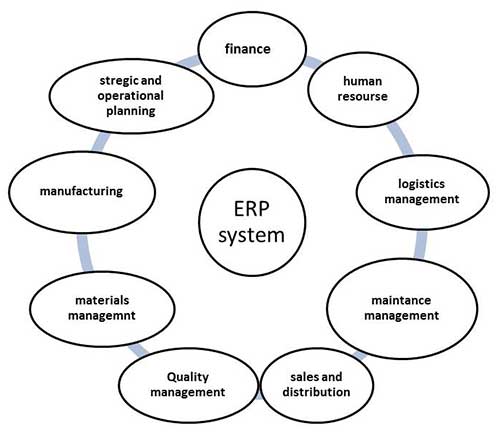
- Core modules manage essential business functions (finance, human resources, manufacturing, supply chain)
- Central database stores and organizes all enterprise data
- Business intelligence tools provide analytics and reporting capabilities
- Workflow management systems automate and optimize business processes
- Integration layer enables communication between different modules and external systems
ERP system architecture
- ERP architecture forms the foundation for integrating various business functions and processes in production and operations management
- Well-designed ERP architecture ensures scalability, flexibility, and efficient data flow across the organization, supporting complex manufacturing and supply chain operations
Modules and integration
- Functional modules address specific business areas (finance, HR, inventory, production)
- Integration layer facilitates seamless data exchange between modules
- Application Programming Interfaces (APIs) enable connections with external systems and third-party applications
- Middleware solutions manage communication between different software components
- Service-oriented architecture (SOA) supports modular design and flexibility in system configuration
Database management
- Centralized database stores all enterprise data in a structured format
- Relational Database Management Systems (RDBMS) organize data into tables with defined relationships
- Data warehousing techniques support historical data analysis and reporting
- Database replication ensures data availability and disaster recovery
- Advanced security measures protect sensitive information (encryption, access controls)
User interface
- Graphical User Interface (GUI) provides intuitive access to ERP functions
- Role-based dashboards display relevant information and tasks for each user
- Customizable layouts allow users to tailor the interface to their specific needs
- Mobile interfaces enable access to ERP functions on smartphones and tablets
- Web-based portals facilitate remote access and collaboration for distributed teams
Implementation of ERP
- ERP implementation is a critical phase in production and operations management, requiring careful planning and execution
- Successful ERP implementation can significantly improve operational efficiency, data accuracy, and decision-making capabilities across the organization
Planning and strategy
- Conduct thorough business process analysis to identify improvement opportunities
- Define clear project scope, objectives, and success criteria
- Develop a detailed project plan with milestones, timelines, and resource allocation
- Establish a cross-functional implementation team with representatives from all affected departments
- Create a change management strategy to address organizational resistance and ensure user adoption
Vendor selection
- Identify key requirements and priorities for the ERP system
- Research and evaluate potential ERP vendors based on industry expertise and product capabilities
- Request for Proposals (RFPs) to obtain detailed information from shortlisted vendors
- Conduct vendor demonstrations and proof-of-concept trials to assess system functionality
- Evaluate Total Cost of Ownership (TCO), including licensing, implementation, and ongoing support costs
Customization vs configuration
- Configuration involves adjusting system settings to match business processes without modifying source code
- Customization requires changes to the ERP software's core functionality to meet specific requirements
- Assess the trade-offs between customization and adopting standard best practices
- Consider the long-term implications of customization on system upgrades and maintenance
- Implement a hybrid approach, balancing configuration and minimal customization for optimal results
Benefits of ERP systems
- ERP systems offer numerous advantages for production and operations management, enhancing overall organizational performance
- Implementing an ERP solution can lead to significant improvements in efficiency, data quality, and cost management across the enterprise

Operational efficiency
- Automates routine tasks, reducing manual effort and minimizing errors
- Standardizes business processes across departments and locations
- Improves resource allocation and utilization through better visibility
- Enhances production planning and scheduling, reducing lead times and inventory levels
- Facilitates faster decision-making through real-time data access and analytics
Data visibility and accuracy
- Provides a single source of truth for all enterprise data
- Eliminates data silos and reduces information inconsistencies
- Enables real-time tracking of key performance indicators (KPIs)
- Improves forecasting and demand planning accuracy
- Enhances traceability and compliance through comprehensive data trails
Cost reduction
- Lowers inventory carrying costs through improved demand forecasting and stock management
- Reduces administrative overhead by automating manual processes
- Minimizes production waste and inefficiencies through better resource planning
- Improves cash flow management with integrated financial processes
- Decreases IT maintenance costs by consolidating multiple legacy systems into a single platform
Challenges in ERP adoption
- ERP adoption presents several challenges for production and operations management teams
- Addressing these challenges is crucial for successful implementation and realizing the full benefits of an ERP system
Implementation costs
- High initial investment for software licenses, hardware, and infrastructure
- Significant expenses for consulting services and system integration
- Ongoing costs for maintenance, upgrades, and user training
- Potential budget overruns due to scope creep or unforeseen complexities
- Opportunity costs associated with dedicating internal resources to the implementation project
Organizational change management
- Resistance to change from employees accustomed to legacy systems and processes
- Need for extensive training programs to ensure user proficiency with the new system
- Cultural shift required to adopt standardized processes and best practices
- Potential disruption to daily operations during the transition period
- Importance of strong leadership support and clear communication throughout the implementation
Data migration issues
- Complexity of extracting and cleansing data from legacy systems
- Challenges in mapping data structures between old and new systems
- Risk of data loss or corruption during the migration process
- Need for data validation and reconciliation to ensure accuracy
- Potential performance issues during large-scale data transfers