2.1 Binary Numbers

⌨️AP Computer Science Principles Unit 2 Review
2.1 Binary Numbers
⌨️ AP Computer Science Principles
Computers store every value as bits, binary digits that can be 0 or 1, and groups of bits are combined to represent numbers, characters, color, and more. For AP Computer Science Principles, convert between binary and decimal, compare binary values, and explain how abstraction and a fixed number of bits affect how data gets represented.
Why This Matters for the AP Computer Science Principles Exam
Binary is the foundation for everything in the Data unit, which carries real weight on the multiple-choice section. Expect questions that hand you a binary value and ask for its decimal equivalent (or the reverse), ask you to order binary numbers, or describe how bits are grouped to represent things like text and color. You will also see questions about the consequences of using bits, such as overflow with a fixed number of bits and why digital data only approximates analog data. Getting comfortable here makes the rest of Unit 2 (compression, extracting information, and using programs with data) much easier to reason about.
Key Takeaways
- A bit is a single binary digit (0 or 1), and 8 bits make a byte.
- Binary is base 2 and uses only 0 and 1; decimal is base 10 and uses 0 through 9. Each position's place value is the base raised to the power of its position, counting from 0 on the right.
- The same sequence of bits can mean different things (a number, a character, part of a color) depending on context.
- Abstraction lets us hide the raw bits and work with numbers, text, and images instead.
- Analog data changes smoothly, so digital data can only approximate it using sampling at regular intervals.
- A fixed number of bits limits the values you can store, which can cause overflow or round-off errors.
What Data Is and How Computers Store It
Data is a collection of facts. You can gather it from many sources, like sensors, surveys, photos, and videos, and it shows up in nearly every field.
When you write programs, data values can be stored in variables, in lists of items, or as standalone constants, and they can be passed as input to or output from procedures. (You will work with variables, lists, and constants more in later topics.)
At the lowest level, computing devices represent data digitally. That means the smallest building block of any value is a bit. Bit is short for binary digit, and it is always either 0 or 1. Put 8 bits together and you have a byte.
To understand how bits store numbers, it helps to start with number bases.
Number Bases


A number base tells you how many digit options a system uses to represent values.
Most of the time you work in the decimal system (base 10), which uses combinations of the digits 0 through 9.
Computers work in the binary system (base 2), which uses only combinations of 0 and 1.
Both systems use place value. In decimal, you have the ones place, the tens place, the hundreds place, the thousands place, and so on.
For example, take 5,729. There is a 5 in the thousands place, a 7 in the hundreds place, a 2 in the tens place, and a 9 in the ones place. So 5,729 is 5 thousands + 7 hundreds + 2 tens + 9 ones.
Here is the key rule that works for any base: a digit's value is the digit itself multiplied by the place value of its position. The place value of each position is the base raised to the power of that position. Positions are numbered starting at 0 on the far right and increasing by 1 as you move left.
In decimal, each place can hold up to 9. Add 1 to 9 and the ones place resets to 0 while the tens place goes up by 1, giving you 10.
In binary, each place can only hold 0 or 1. Because the base is 2, the place values are powers of 2: the ones place (2^0), the twos place (2^1), the fours place (2^2), the eights place (2^3), and so on.
Reading a Binary Number
Take the binary number 0101. Line up the place values from the right:
| Place value | 8 | 4 | 2 | 1 |
|---|---|---|---|---|
| Bit | 0 | 1 | 0 | 1 |
There is a 1 in the fours place and a 1 in the ones place, so the value is 4 + 1 = 5.
To go the other way (decimal to binary), find the largest power of 2 that fits, place a 1 there, subtract, and repeat with what is left. For example, 5 fits a 4, leaving 1, which fits the ones place, giving 0101.
Comparing and Ordering Binary Numbers
To compare binary numbers, convert them to decimal and compare normally, or line them up by place value. A 1 in a higher place value always outweighs any combination of lower places. For example, 1000 (which is 8) is greater than 0111 (which is 7), even though 0111 has more 1s.
How Bits Represent Different Kinds of Data
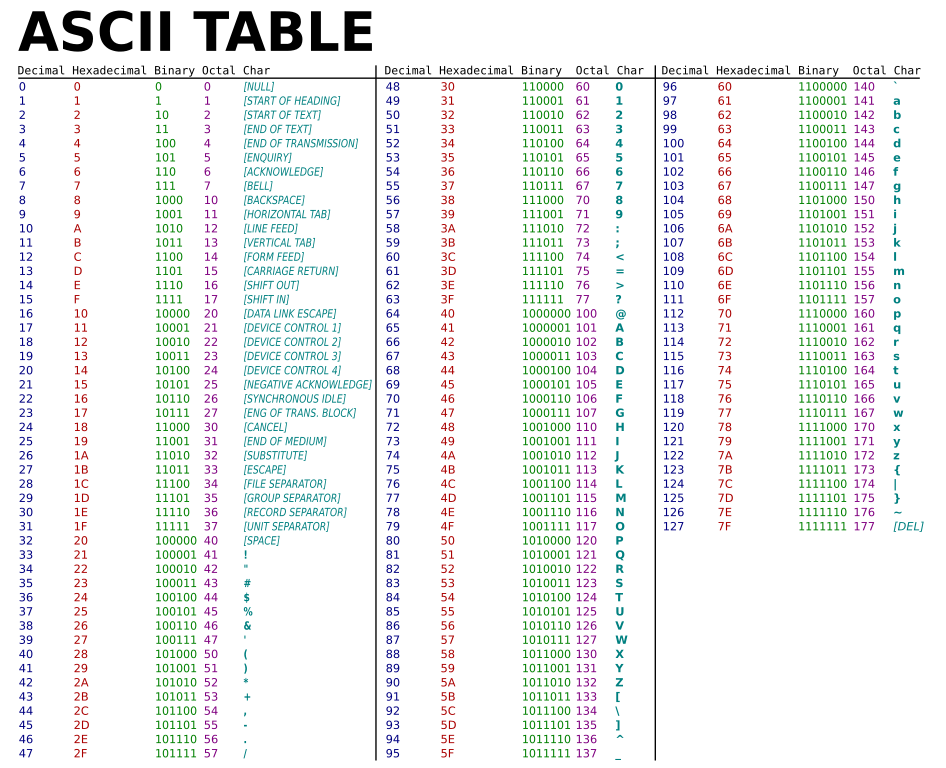
Bits are grouped to represent abstractions. Those abstractions include, but are not limited to, numbers, characters, and color.
An important consequence: the same sequence of bits may represent different types of data in different contexts. A binary pattern that means the number 65 in one situation could stand for the character "A" in another. Programs are written to know what a given sequence of bits is supposed to represent, which is why standards for encoding text and color matter.
Abstraction
Abstraction is the process of reducing complexity by focusing on the main idea. It works by hiding details that are not relevant to the question at hand and bringing together the details that are useful, so you can focus on the idea instead of the mechanics.
A non-computing example: pressing the start button on a microwave. You do not need to know how it generates heat to use it. The button focuses on the main idea (start heating) and hides the inner workings.
The same thing happens with your computer. It stores data in bits, but programs let you work with variables, lists, and visuals like charts. You almost never deal with raw 0s and 1s, because that detail is hidden. Code statements and screen displays are abstractions sitting on top of the binary underneath.
Analog Data and Sampling

Analog data has values that change smoothly over time, rather than in separate, discrete steps. Examples include the pitch and volume of music, the colors of a painting, or the position of a sprinter during a race.
To store analog data on a computer, you use a sampling technique: you measure the analog signal at regular intervals called samples, then figure out the exact bits needed to store each sample.
Because digital values come in a finite set of steps while analog values are continuous, digital data can get very close but cannot perfectly capture analog data. Using digital data to approximate real-world analog data is itself an example of abstraction, since it leaves out detail to keep things manageable.
Consequences of Using a Fixed Number of Bits


In many programming languages, integers are stored using a fixed number of bits. That puts a limit on the range of values you can store and the operations you can do on them, which can lead to overflow or other errors.
Think about a value stored in one byte (8 bits):
| Place value | 128 | 64 | 32 | 16 | 8 | 4 | 2 | 1 |
|---|---|---|---|---|---|---|---|---|
| Bit | 1 | 1 | 1 | 1 | 1 | 1 | 1 | 1 |
The largest value is 128 + 64 + 32 + 16 + 8 + 4 + 2 + 1 = 255. A faster way to get this: take the next power of 2 above the chart (2^8 = 256) and subtract 1. If you try to store 256 or more, there is no place to hold it, and you get an overflow error. Overflow can show up in surprising ways, like a value flipping sign or becoming something unexpected, and it does not always stop the program, which makes it tricky to catch.
Some languages avoid this fixed limit by letting integer size grow up to the limits of the computer's memory. The language defined on the exam reference sheet works this way, so you do not have to worry about a fixed integer cap for exam pseudocode.
Real numbers face a related issue. Because only a fixed number of bits is available, some real numbers are stored as approximations, which can lead to round-off and other errors. You do not need to memorize specific range limits for real numbers, but you should know that this approximation happens. This is another form of abstraction, since the stored number is a simplified version of the true value.
How to Use This on the AP Computer Science Principles Exam
MCQ
- Be quick at converting both directions. Given binary, sum the place values where there is a 1. Given decimal, subtract the largest fitting power of 2 and repeat.
- When ordering binary numbers, do not just count the 1s. Convert to decimal or compare from the highest place value down.
- Watch for questions where the same bit pattern represents different data depending on context. The correct answer usually points out that meaning depends on how the bits are interpreted.
Common Trap
- Forgetting that positions start at 0 on the right. The rightmost bit is the ones place (2^0), not 2^1.
- Assuming digital can perfectly equal analog. Sampling gives an approximation, not an exact copy.
- Treating overflow as a guaranteed crash. It often produces a wrong value instead of stopping the program.
Common Misconceptions
- Misconception: A byte is any group of bits.Actually: A byte is specifically 8 bits.
- Misconception: More 1s means a bigger binary number.Actually: Place value is what matters. A single 1 in a high position can outweigh several 1s in lower positions.
- Misconception: Each binary pattern always means one thing.Actually: The same sequence of bits can represent a number, a character, or part of a color depending on context.
- Misconception: Digital recordings are exact copies of real sound or motion.Actually: They are approximations built from samples taken at intervals.
- Misconception: Every language has a fixed integer limit.Actually: Some languages, including the one on the exam reference sheet, only limit integer size by available memory.
- Misconception: Abstraction is only about code.Actually: Abstraction is any time you hide unnecessary detail to focus on the main idea, like a start button or a digital clock showing only hours and minutes.
Related AP Computer Science Principles Guides
Frequently Asked Questions
What are binary numbers in AP CSP?
Binary numbers are base 2 numbers that use only 0 and 1. AP CSP uses binary to explain how computing devices represent data at the lowest level with bits.
What is a bit in AP Computer Science Principles?
A bit is a binary digit, either 0 or 1. Bits are the lowest-level components of digital data, and groups of bits can represent numbers, characters, colors, and other abstractions.
How do you convert binary to decimal?
Multiply each binary digit by its place value, using powers of 2 from right to left. For example, 1011 equals 1 times 8 plus 0 times 4 plus 1 times 2 plus 1 times 1, so it equals 11 in decimal.
How do you convert decimal to binary?
Break the decimal number into powers of 2 or repeatedly divide by 2 and read the remainders from bottom to top. AP CSP only expects positive integer conversions for this topic.
Why can fixed bits cause overflow?
A fixed number of bits can represent only a limited range of values. If a calculation produces a value outside that range, the result can overflow or cause an error, depending on the system.
How does binary connect to abstraction?
Binary connects to abstraction because raw bits can be grouped and interpreted as higher-level data, like text, images, or numbers. The same bit sequence can mean different things depending on context.
See Fiveable more often in Google
Mark Fiveable as a preferred source and Google is more likely to show you our guides in Top Stories, with a "preferred" badge in AI Mode and AI Overviews.