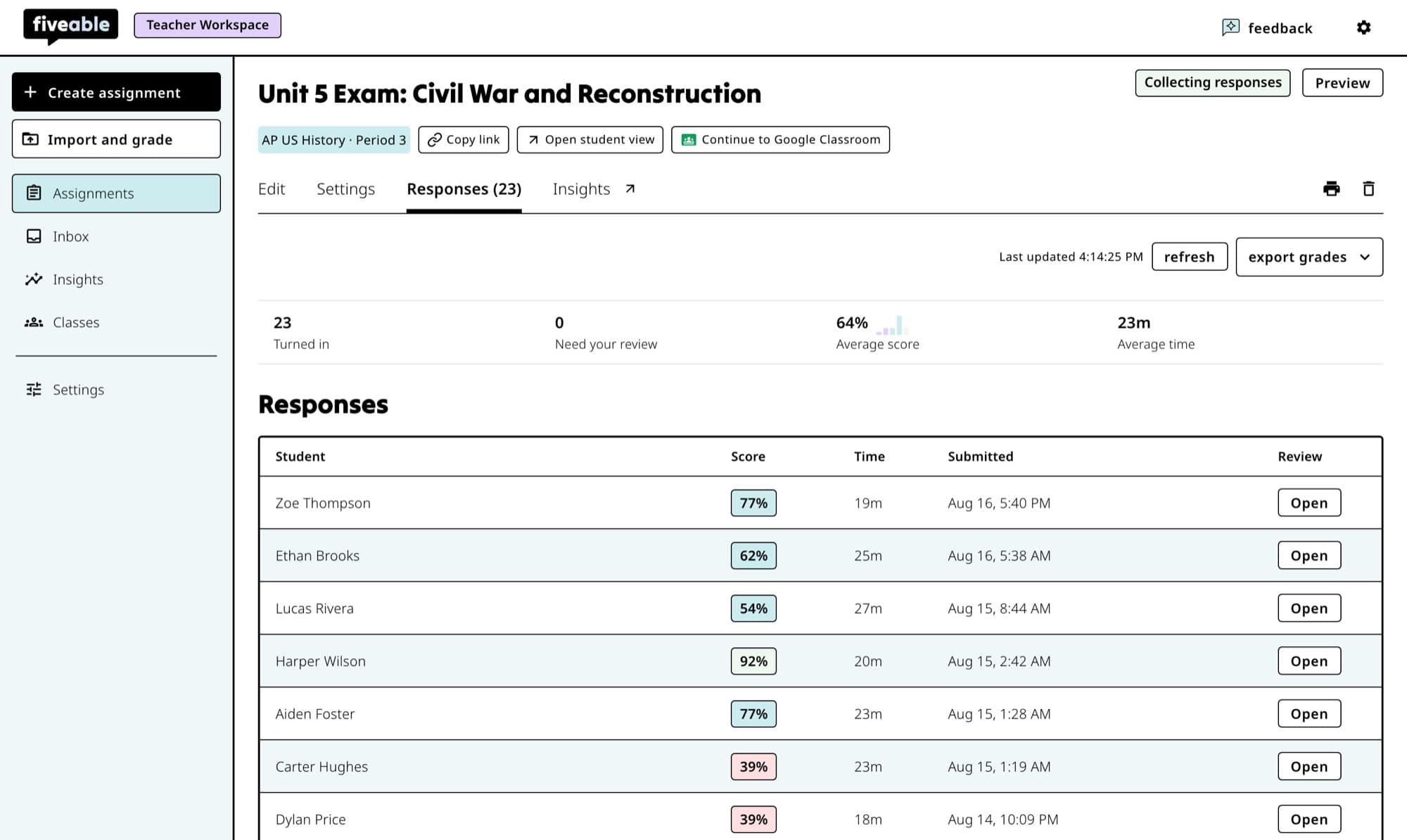
Assign AP® MCQs, FRQs, and readings. Get it back already graded.
Students complete the assignment on Fiveable, on a screen that works like the exam. Multiple choice scores on submit, and free responses come back with an AI score you can review and change, and you choose whether students see scores right away. Students who fall short get a review and a second attempt, and you see mastery by unit and skill across every assignment you’ve sent.
Assign AP® MCQs, FRQs, and readings, or import essays you already collected. Multiple choice scores on submit, and every essay comes back with an AP rubric score you can review and change.
Your first 3 assignments are included. No card needed.
“
This is the most amazing thing in the world. You just saved me about 2 hours of reading and feedback.
— AP® Teacher
districts with 1k+ students using Fiveable:


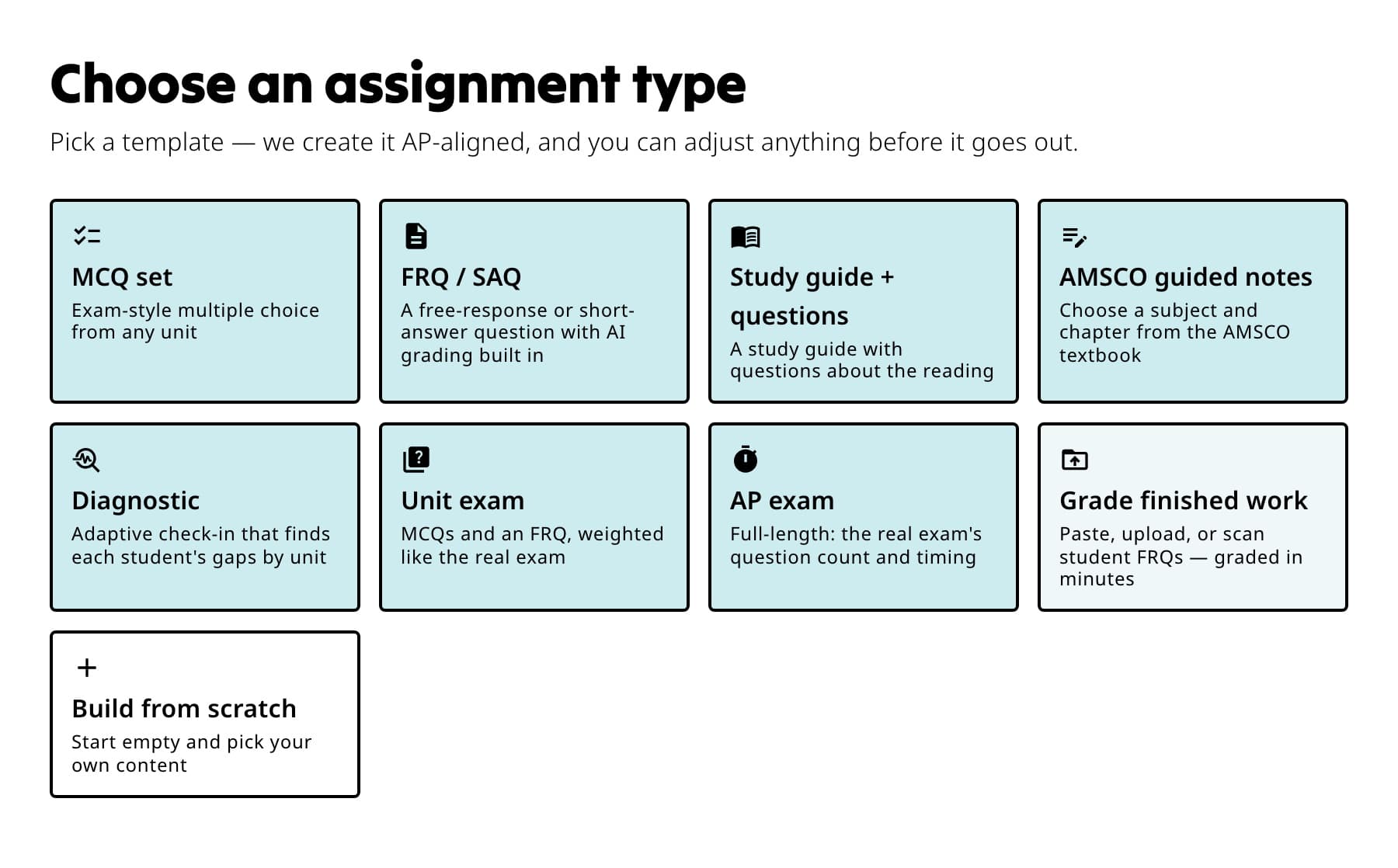
Start from a template
MCQ sets, FRQs, unit exams, full AP® exams, diagnostics, and guided reading, built from our question banks for every AP® subject with a written exam. Choose the questions, set the timing and due date, then share a link or post it to Google Classroom.
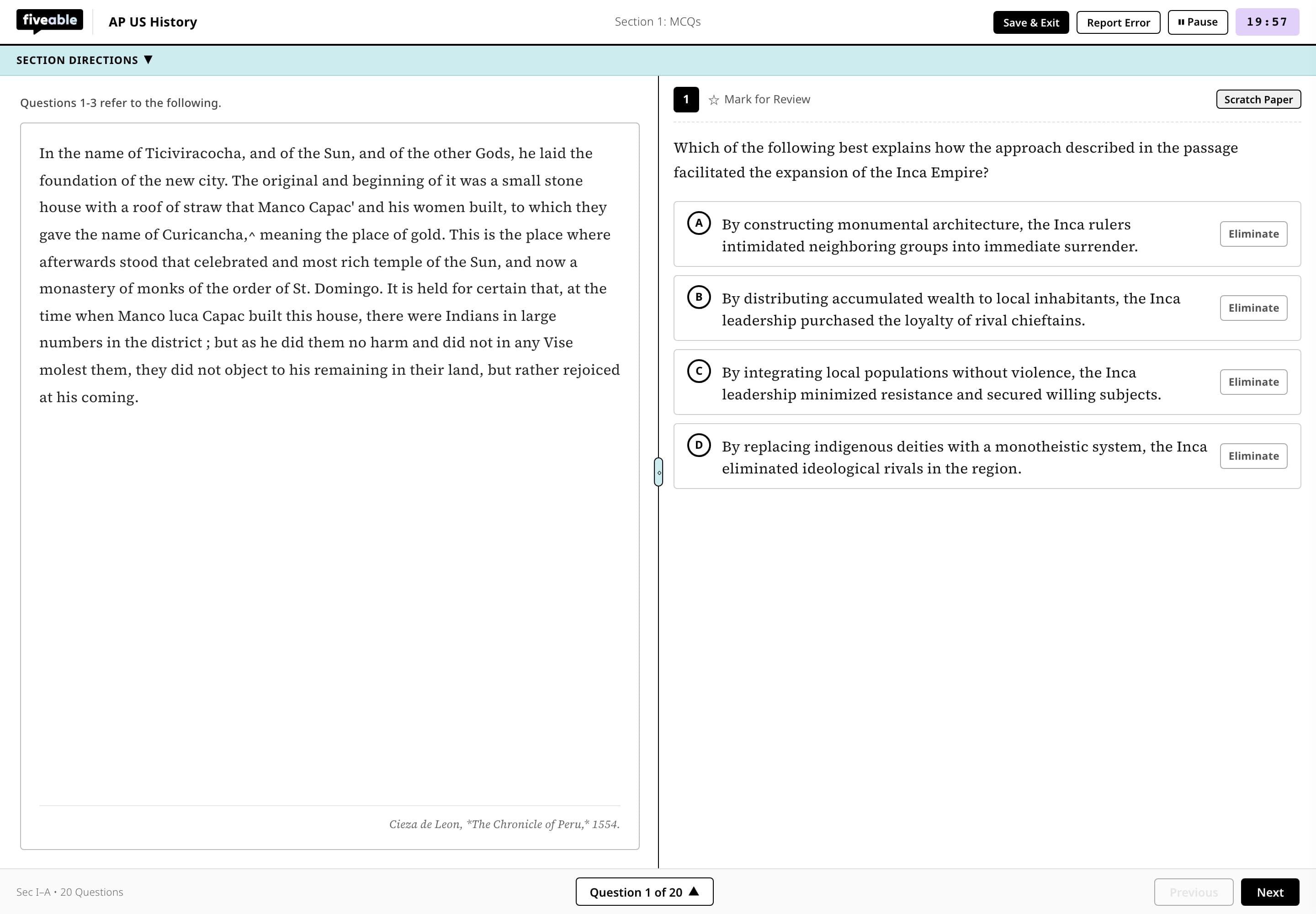
Students complete the assignment on Fiveable with their own accounts
No student subscription needed. They open the link and take the assignment, which is modeled after the real exam experience. You control every setting: timing, attempts, auto-grading, reteaching, and late work.
Grading is done when they turn it in
Multiple choice scores on submit. Every Fiveable FRQ has scoring guidelines Fiveable wrote for its question type, and essays are graded against those. You see the AI score, change it if you disagree, add feedback, and release the set.
We've graded 80,000+ FRQs on Fiveable, 53,000+ of them for AP® teachers, who kept 96.2% of the scores they reviewed one at a time.
“
Scores are actually very accurate and the feedback is very good. More accurate than other AI systems I've tried and given up on. Fiveable FRQs is by far the strongest yet.
— AP® Teacher
How the AI scores an FRQ
Every first pass follows the same four steps, built around how each AP® question type earns points. You see the reasoning for every rubric row, so agreeing or changing a score takes seconds.
Scoring criteria prepared
For each FRQ, the AI prepares detailed scoring criteria based on how that question type and subject earn points.
Every response read in full
Each essay is checked against every rubric point, looking for understanding, reasoning, and completeness rather than keywords.
Point-by-point scoring
Each rubric row gets its own score with a plain explanation of what was earned and what was missed.
Feedback students can act on
Beyond the score, students see what to include next time and how to strengthen their reasoning.
Bring in work from wherever it lives
Assignments students complete on Fiveable grade themselves. For everything else, import a class set and grade it the same way.

Google Classroom
Connect a class, pick the assignment, and every submission comes in.

Google Drive
Paste a folder link and we pull each student doc, shared drives included.
AP® Classroom export
Upload the export file and the responses are ready to score.
Handwritten work
Scan a stack with the Fiveable iOS app, or upload photos.
Paste or upload
Drop in text or files for a one-off set.
Hand graded essays back with one link
Grade a class set of paper essays, then share one link. Each student sees their own feedback and rewrites the part they missed, and you see their first score beside their score now.
Your score
2 of 3 points
Part A
Earned the point. You identified a specific technology that made trade easier.
Part C
Did not earn the point. Say who or what moved along the routes and what changed as a result.
Today · about 10 minutes
1. Part C: a short lesson, then rewrite it and get it scored
What came back
Each student's first score next to their score now. A rewrite never changes the score you graded.
19 of 28
opened the link
5 → 14
students earning part C
| Student | First | Worked on | Now | Status |
|---|---|---|---|---|
| Student A | 1 / 3 | Part C | 2 / 3 | done |
| Student B | 2 / 3 | Part C | 3 / 3 | done |
| Student C | 0 / 3 | Parts B and C | 1 / 3 | needs you |
| Student D | 1 / 3 | Part C | 1 / 3 | in progress |
Reteach is built in
A student who scores low gets a short review of the section they missed, then a second attempt on new questions aligned to the same topics. You decide whether the highest score counts.
Improve your score
Fill in your gaps and try again — a quick review of 1.5 Labor, Slavery, and Caste in the Spanish Colonial System, then your next attempt.
Attempt 1 of 2 · Highest counts
1.5 Labor, Slavery, and Caste in the Spanish Colonial System
As disease and warfare reduced Native populations in North and South America, Europeans looked for new sources of labor. Africans were forcibly brought to the Americas, first in larger numbers to South America and the Caribbean and later to North America.
The transatlantic slave trade was the system of buying, selling, and transporting African people to the Americas and other parts of the world as slaves. It was a major part of the Atlantic trade network, known as the triangular trade, which also included the trade of goods such as sugar, tobacco, tea, rifles, and other products.
Insights by assignment, student, and class
Which students are sliding, and the topic your class is weakest on right now. Mastery by unit and by skill across every assignment you've sent. This sample is live: switch the view or open a unit.
Students
6 students dropped 10+ points over their last two assignments.
Content
1.5 Labor, Slavery, and Caste in the Spanish Colonial System is your weakest topic right now (20%).
Progress map
by unit
by skill
See where students need support, across classwork and diagnostics. Click a unit to see its topics.
Unit 1 – Interactions North America, 1491–1607
40%
▸
Unit 2 – Colonial Society, 1607–1754
58%
Unit 3 – Conflict and American Independence, 1754–1800
76%
▸
Unit 4 – American Expansion, 1800–1848
63%
Unit 5 – Civil War and Reconstruction, 1844–1877
66%
▸
Unit 6 – Industrialization and the Gilded Age, 1865–1898
59%
Unit 7 – Industrial and Economic Growth, 1890–1945
71%
Unit 8 – Postwar America, 1945–1980
Not assessedUnit 9 – Globalization and the Digital Age, 1980–present
Not assessedUse it from ChatGPT or Claude
Connect your workspace to the AI chat you already use and ask in plain words. Essays are scored on the AP rubric, and anything students would see waits for your yes.
“I have 94 DBQs and one weekend.”
Grade the stack on the AP rubric, then check the drafts yourself before anything is final.
“What do I reteach on Monday?”
Find what the class missed most, with a short reteach and an exit ticket.
“I need a warm-up for tomorrow.”
Five Fiveable questions on last week’s weakest topic, with a key for you.
Unlock unlimited assignments
In both plans
- Unlimited assignments, every template above
- AI first reads, with you releasing every grade
- Grading for finished work, including scans and imports
- Insights, reteach, and exports
- Everything students get, for every AP® subject
Annual adds the print center
- Printable study guides, FRQ sets with scoring guidelines, and cheatsheets
- Full practice exams as PDFs
- AMSCO guided notes exported to Google Docs
- Quizzes from our MCQ banks as Google Forms
Teacher Workspace
For assigning, grading, and reteaching, month to month.
per month
Unlimited assignments and AI first reads
Insights and reteach for every class
Grade finished work, including scans and Google Classroom imports
CSV, Google Sheets, and PDF export
Teacher Workspace + Printing
For teachers who print, and who'd rather pay once.
per year
Everything in Teacher Workspace
The print center: study guides, FRQ sets, cheatsheets, and practice exams as PDFs
AMSCO guided notes as Google Docs
Quizzes as Google Forms
Questions teachers ask
Does the AI grade FRQs?
Yes, against scoring guidelines we wrote for every AP® FRQ type. You see the AI score and can change it before students do.
Do students need accounts?
They need their own Fiveable account, not a paid subscription. They sign in with Google or email, and the assignment link works inside Google Classroom.
Can I use my own questions?
Not yet. Every assignment is built from Fiveable's question bank, and you choose which questions go in. Grade finished work scores FRQs you paste, upload, or scan.
What happens after my 3 included assignments?
Student work keeps collecting and nothing is lost. To grade the fourth assignment and beyond, Teacher Workspace is $29 a month. Cancel anytime, and there's a 7-day refund window.
Does the grading tool I've been using go away?
No. It's the Grade finished work template now, and printables, AMSCO notes, and the quiz builder are where they've always been.
Will my students see offers from Fiveable?
Your assignment and its results are never locked. After results, students see Fiveable practice for the topics they missed, and students without a plan see how to unlock the rest. Turn off Practice suggestions in an assignment's settings to hide all of it.
Does Fiveable email my students?
Students get an email when their results are ready, with their score and what to practice next, plus a Sunday summary of the work they turned in that week. Neither has any pricing in it. Turn off Results email in an assignment's settings to leave that assignment out of both, and students can turn the weekly summary off themselves.
Which subjects are covered?
Every AP® subject with a written exam, aligned to the 2027 exams. AP® Art and Design and AP® Research are scored on portfolios rather than a written exam, so they don't have question sets to assign.
Printable packs for your class
One-time purchase, no subscription. Share handouts with your students. Every pack is included with Teacher Workspace + Printing.



Start with your AP course
See practical assignment sequences, feedback workflows, and review resources for the course you teach. Students can complete your assignments with their own Fiveable accounts, no plan needed.
AP World History
Plan source analysis, historical reasoning, and essay practice for your AP World class.
Explore teacher resourcesAP US History
Connect periods, primary sources, and evidence-based writing in your AP US History assignments.
Explore teacher resourcesAP Human Geography
Build practice around maps, models, geographic scale, and clear FRQ explanations.
Explore teacher resourcesTry it with one class
Pick a template, send the link, and see what comes back. Your first 3 assignments are included.
create your first assignmentReady for your school's review
Give your business office and technology team one place to start. Find purchasing paperwork, privacy agreements, and the information they need to evaluate Fiveable.
Purchasing documents
Request our signed W-9, vendor forms, and other paperwork before placing your order.
Request documentsDistrict relationships
See districts we've worked with on student privacy paperwork and request a copy for your office.
View districtsNIST CSF 2.0
Our security program is structured around the NIST Cybersecurity Framework's six functions.
See security practicesAccessibility report
Review our accessibility conformance report, testing approach, and known limitations.
View the report