
Device drivers and controllers are crucial components in input/output systems. They bridge the gap between the operating system and hardware devices, enabling seamless communication and control. This topic explores their roles, functionalities, and interactions within the I/O subsystem.
Device drivers provide a standardized interface for the OS, abstracting hardware details. Meanwhile, device controllers directly interface with I/O devices, managing low-level communication and data transfer. Together, they form a vital link in the I/O chain.
Device Drivers: Purpose and Functionality
Intermediary Role and Standardization
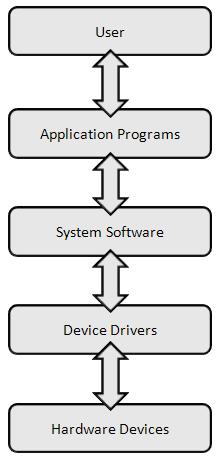
- Device drivers act as intermediaries between the operating system and hardware devices enabling communication and control
- Provide a standardized interface for the operating system to interact with various hardware devices regardless of specific implementation details
- Abstract hardware-specific details allowing the operating system to manage devices using a consistent set of commands and protocols (USB, PCI)
- Handle device initialization, configuration, and management of device-specific features and capabilities (power settings, performance modes)
Translation and Management
- Translate high-level operating system commands into low-level hardware instructions that the device can understand and execute
- Manage device interrupts handle error conditions and implement power management features for controlled devices
- Implement buffering and caching mechanisms to optimize data transfer between the operating system and hardware devices
- Coordinate data flow between the device and system memory often using Direct Memory Access (DMA) for efficient transfers
Device-Specific Operations
- Implement device-specific protocols and communication standards (SCSI for storage devices, PostScript for printers)
- Handle timing-sensitive operations ensuring proper synchronization between the device and the system
- Provide diagnostic information and error logs to assist in troubleshooting device issues
- Support firmware updates and device-specific configuration changes
Device Controllers: Role in I/O Management
Hardware Interface and Communication
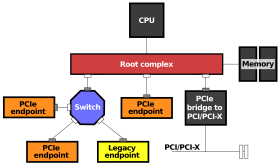
- Device controllers directly interface with and control I/O devices acting as a bridge between the device and the computer's main system
- Handle low-level communication protocols and timing requirements specific to the attached I/O device (SATA for hard drives, PCIe for graphics cards)
- Implement device-specific command sets and status registers allowing the operating system to monitor and control device operations
- Generate interrupts to signal the completion of I/O operations or to indicate error conditions to the CPU
Data Management and Transfer
- Manage data transfer between the I/O device and the computer's main memory often using Direct Memory Access (DMA) for efficient data movement
- Buffer data to accommodate differences in data transfer rates between the I/O device and the computer system
- Implement error detection and correction mechanisms to ensure data integrity during I/O operations (ECC for memory controllers, CRC for network controllers)
- Handle data formatting and protocol conversion between the device and system bus (converting analog signals to digital for audio controllers)
Performance Optimization
- Implement hardware-level caching to improve I/O performance (disk controller cache)
- Support advanced features like command queuing and out-of-order execution to optimize I/O operations (NCQ for SATA controllers)
- Provide hardware-assisted encryption and decryption for secure data transfer (self-encrypting drives)
- Implement power management features to optimize energy consumption of I/O devices
Communication Between Drivers and Controllers
Register and Port Interaction
- Device drivers communicate with device controllers through memory-mapped registers or I/O ports sending commands and receiving status information
- Use standardized protocols often defined by bus architecture (PCI, USB) to exchange data and control signals with the device controller
- Implement interrupt handlers to respond to interrupts generated by the device controller processing completed I/O operations or error conditions
- Manage DMA operations in coordination with the device controller setting up memory buffers and initiating data transfers
Communication Mechanisms and Error Handling
- Implement polling mechanisms to periodically check the device controller's status when interrupt-driven I/O is not suitable or available
- Handle device-specific initialization sequences and configuration settings by programming the device controller appropriately
- Implement error recovery and retry mechanisms to handle communication failures or timeouts with the device controller
- Use handshaking protocols to ensure synchronization between the driver and controller during complex operations (multi-step data transfers)
Advanced Communication Techniques
- Support scatter-gather I/O operations allowing non-contiguous memory regions to be used in a single transfer
- Implement asynchronous I/O operations to improve system responsiveness and throughput
- Use memory barriers and cache coherency instructions to ensure proper synchronization in multi-core systems
- Support device-specific diagnostic and debugging features for troubleshooting communication issues
Device Driver Abstraction: Benefits and Importance
System Portability and Hardware Integration
- Provide a uniform interface for the operating system to interact with diverse hardware devices enhancing system portability across different hardware configurations
- Allow hardware manufacturers to develop and update device drivers independently of the operating system facilitating easier integration of new devices
- Support hot-swapping and plug-and-play functionality allowing devices to be added or removed without requiring system reboots or extensive reconfiguration
- Enable seamless support for legacy devices through abstraction layers (NTVDM for DOS applications on Windows)
System Stability and Security
- Improve system stability by isolating device-specific code from the core operating system reducing the risk of system-wide failures due to device driver issues
- Enable the operating system to implement security and access control measures consistently across different devices enhancing overall system security
- Facilitate the implementation of device driver sandboxing and virtualization techniques further improving system stability and security
- Allow for easier implementation of device driver updates and rollbacks enhancing system maintainability and reducing downtime
Performance and Resource Management
- Enable efficient resource allocation and sharing among multiple devices (IRQ sharing, memory management)
- Facilitate implementation of power management policies across diverse hardware components
- Support load balancing and performance optimization techniques for multi-device configurations (RAID controllers, multi-GPU setups)
- Allow for dynamic device configuration and resource allocation based on system demands and priorities