
Benefits and Challenges of Technology Integration
Technology integration in education refers to the purposeful use of digital tools to support teaching and learning. Understanding both its potential and its pitfalls matters because philosophy of education asks us not just whether we can use a tool, but whether we should and for whom.
Benefits of Educational Technology
Enhanced engagement is one of the most cited advantages. Interactive content like simulations, videos, and multimedia presentations can make abstract ideas concrete in ways a textbook alone cannot.
Personalized learning becomes possible through adaptive platforms that adjust difficulty and pacing to individual students. Tools like Khan Academy or IXL track performance and serve different problems based on what a student has already mastered. This shifts instruction away from a one-size-fits-all model.
Expanded access to resources means students aren't limited to what's physically in their classroom. Online libraries, educational video archives, and open databases put a much wider range of material within reach.
Other notable benefits include:
- Improved collaboration through virtual group projects and online discussion boards, which can connect students across classrooms or even countries
- Digital literacy development, which prepares students for a workforce where technology fluency is expected, not optional
Challenges of Educational Technology
The digital divide is the most pressing equity concern. Students from low-income families or rural areas often lack reliable internet access or personal devices. Integrating technology without addressing this gap can actually widen existing inequalities rather than close them.
Infrastructure and cost strain school budgets. Hardware, software licenses, IT support, and network maintenance all require sustained funding, not just a one-time purchase.
Additional challenges include:
- Teacher training that struggles to keep pace with rapidly evolving tools. A platform introduced one year may be obsolete the next.
- Distraction and reduced face-to-face interaction, which can undermine social skill development if technology replaces rather than supplements direct human engagement
- Cybersecurity and privacy risks, especially when platforms collect student data. Schools must navigate questions about who owns that data and how it's used.
Evaluation and Design of Educational Technologies
Choosing the right technology isn't about picking the newest or flashiest tool. It's about matching a tool's capabilities to specific learning goals, student needs, and institutional context.
Evaluating Different Types of Educational Technology
Learning Management Systems (LMS) like Canvas or Blackboard serve as central hubs for course organization. They handle assignment submission, grading, and communication in one place. These work across educational levels, from K-12 to higher education, though the features you emphasize will differ. A middle school teacher might rely on the gradebook and parent communication tools, while a university instructor might use discussion forums and peer review workflows.
Educational apps and software tend to target specific skills or subjects. Duolingo focuses on language acquisition through spaced repetition; Photomath walks students through problem-solving steps. Adaptive learning platforms are a subset of these: they adjust content difficulty in real time based on student performance, making them especially useful for subjects where students enter at very different skill levels.
Virtual and augmented reality tools create immersive experiences for concepts that are hard to grasp in two dimensions. Virtual field trips can take a geography class inside a volcano; medical students can practice procedures in simulation before touching a real patient. The key evaluation question is whether the immersion adds genuine understanding or just novelty.
Online collaboration tools like Zoom, Microsoft Teams, Google Docs, and OneDrive enable remote learning and real-time group work. Their value became especially clear during pandemic-era schooling, but they remain useful for connecting students across distances and teaching collaborative work habits.
Assessment and feedback technologies range from simple quiz platforms (Kahoot, Google Forms) that provide immediate feedback, to automated grading systems (Gradescope) that reduce teacher workload on objective assessments. These tools generate data that can inform instruction, but they work best for measuring certain kinds of knowledge and are less suited to evaluating creative or open-ended work.
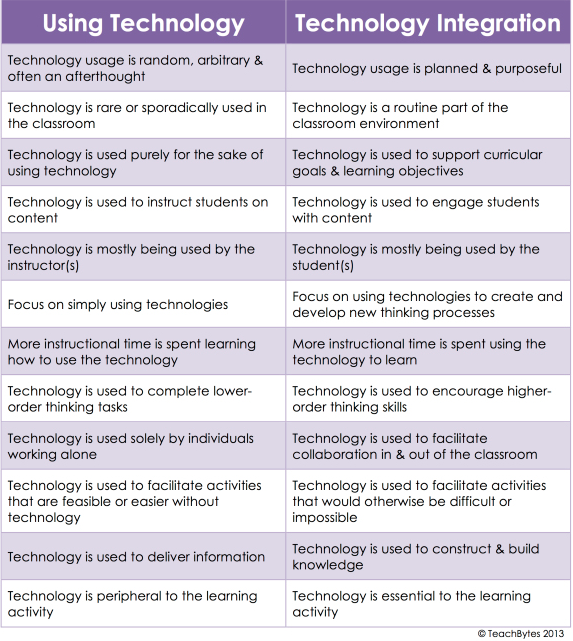
Designing Technology-Enhanced Learning Activities
The flipped classroom model reverses the traditional sequence: students watch video lectures or engage with content at home, then use class time for application, discussion, and problem-solving. This works because it moves passive absorption outside the classroom and reserves face-to-face time for the activities that most benefit from teacher guidance.
The design process looks like this:
- Identify which content can be effectively delivered through video or reading
- Create or curate pre-class materials students can engage with at their own pace
- Design in-class activities that build on that content through application, collaboration, or debate
- Build in accountability checks (brief quizzes, discussion prompts) so students arrive prepared
Project-based learning with technology uses digital tools to support creative, student-driven work. Digital storytelling platforms (iMovie, Adobe Spark) let students construct narratives around course content, while multimedia presentation tools (PowerPoint, Prezi) develop communication and design skills alongside subject knowledge.
Gamification applies game elements to educational contexts. This can mean full educational games (Minecraft Education Edition for spatial reasoning, Quizizz for review) or lighter touches like badge systems and leaderboards. The philosophical question worth considering: does gamification cultivate intrinsic motivation, or does it train students to expect external rewards?
Collaborative online projects use wikis, shared documents (Google Sites, PBworks), and discussion platforms (Padlet, Flipgrid) to promote peer learning and knowledge construction. These tools work well when the task genuinely requires collaboration rather than just dividing work among individuals.
Technology-enhanced inquiry-based learning teaches students to find, evaluate, and analyze information using digital tools. This includes developing online research skills and information literacy, as well as using data analysis software (Excel, Tableau) to develop quantitative reasoning. The emphasis here is on process, not just product.
Ethical and Equitable Considerations
Philosophy of education demands that we examine technology integration not just for effectiveness but for justice. Who benefits? Who is excluded? What values are embedded in the tools themselves?
The Digital Divide
Socioeconomic factors like household income, parental education level, and geographic location all affect technology access. A 2023 Pew Research study found that roughly 25% of lower-income U.S. households lack home broadband. Rural communities face additional infrastructure barriers: even when families can afford devices, reliable high-speed internet may not be available.
This means any technology-dependent assignment carries an implicit equity question. If a student can't complete homework because they lack Wi-Fi at home, the technology isn't enhancing learning for that student; it's creating a barrier.
Accessibility for Students with Disabilities
Assistive technologies like screen readers, speech-to-text software, and alternative input devices can make digital learning accessible to students with disabilities. But accessibility isn't just about adding tools after the fact. Universal Design for Learning (UDL) principles call for building content that's accessible to all learners from the start: multiple means of representation, engagement, and expression.

Data Privacy and Security
When students use digital platforms, they generate data. Who collects it, how it's stored, and what it's used for are serious ethical questions. In the U.S., laws like FERPA and COPPA set baseline protections, but many educational apps collect data beyond what's strictly necessary for learning. Schools need robust responsible use policies and should vet platforms for their data handling practices before adoption.
Intellectual Property and Copyright
Fair use in educational contexts allows limited use of copyrighted materials for teaching purposes, but the boundaries aren't always clear. Open Educational Resources (OER) offer an alternative: freely accessible, openly licensed content that can be used, adapted, and shared without legal risk. Choosing OER when possible also addresses equity, since students don't need to purchase expensive materials.
Cultural Sensitivity
Digital content can carry cultural assumptions that exclude or misrepresent certain groups. Evaluating educational technology should include asking whether the content reflects diverse perspectives and whether it can be localized for different cultural contexts and languages.
Cyberbullying and Online Safety
Any platform that allows student interaction creates the possibility of misuse. Digital citizenship education teaches responsible online behavior, including how to communicate respectfully, protect personal information, and respond to harassment. This isn't a one-time lesson but an ongoing part of technology-integrated instruction.