
Session management overview
Session management controls and maintains the state of user interactions across multiple requests in a networked environment. Since HTTP is inherently stateless (each request is independent), session management is the mechanism that ties a series of requests together into a coherent "conversation" between a user and a server.
Getting this right is a core security concern. If session management is weak, attackers can impersonate legitimate users, access sensitive data, or perform unauthorized actions. Every web application that requires login depends on solid session management.
Session initiation protocols
TCP three-way handshake
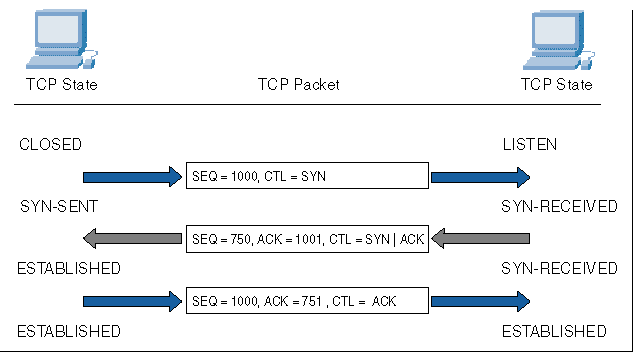
Before any session-level data is exchanged, the underlying TCP connection must be established. This happens through a three-step process:
- SYN: The client sends a synchronize packet to the server, proposing an initial sequence number.
- SYN-ACK: The server responds with its own sequence number and acknowledges the client's.
- ACK: The client acknowledges the server's sequence number, and the connection is established.
This handshake ensures both parties agree on sequence numbers for reliable, ordered data transmission. It's the foundation that higher-level session management builds on.
Session establishment techniques
Once the transport connection exists, the application layer establishes a user session. This typically involves:
- Authentication: The user proves their identity through credentials (username/password) or multi-factor authentication. No session should be created until identity is verified.
- Token or cookie generation: After successful authentication, the server generates a session token and sends it to the client, usually as a cookie. The client includes this token in every subsequent request so the server can identify the session.
- Secure transport: Session establishment should always happen over HTTPS. Transmitting credentials or session tokens over plain HTTP exposes them to interception.
Session ID generation
The session ID is the single piece of data that identifies a user's session. If an attacker can predict or steal it, they own the session. That's why generation quality matters so much.
Pseudo-random number generators
Pseudo-random number generators (PRNGs) produce sequences of numbers that look random but are actually deterministic. Given the same seed value, a PRNG will produce the same sequence every time.
Common PRNGs include linear congruential generators (LCGs) and the Mersenne Twister. These are fast and useful for many purposes, but standard PRNGs are not sufficient for session ID generation on their own. If an attacker can determine or guess the seed, they can predict future session IDs.
Cryptographically secure randomness
For session IDs, you need a cryptographically secure PRNG (CSPRNG). These draw from unpredictable entropy sources like hardware noise, system event timing, or OS-level randomness pools (e.g., /dev/urandom on Linux).
The output is then often processed through cryptographic hash functions like SHA-256 or key derivation functions like PBKDF2 to produce IDs that are:
- Sufficiently long (at least 128 bits of entropy is a common recommendation)
- Uniformly distributed
- Computationally infeasible to predict
Using a CSPRNG is the baseline requirement for preventing session hijacking through ID prediction.
Session data storage
Server-side session storage
The server stores session data (user identity, permissions, preferences) in memory, a database, or a dedicated session store like Redis. The client only holds the session ID.
- Sensitive data never leaves the server, reducing exposure.
- The server has full control over session lifecycle and can invalidate sessions instantly.
- The tradeoff is increased server resource usage, and in distributed environments, session data must be shared or replicated across servers.
Client-side session storage
Session data is stored on the client, typically in cookies or browser web storage (localStorage, sessionStorage). A common approach is JSON Web Tokens (JWTs), where session claims are encoded and cryptographically signed.
- Reduces server load since the server doesn't need to look up session data.
- The major risk is tampering. Client-side tokens must be cryptographically signed (and ideally encrypted) so the server can verify their integrity.
- Client-side storage is also vulnerable to cross-site scripting (XSS) attacks, where malicious scripts can read stored tokens.
Hybrid session storage approaches
Many production systems combine both approaches:
- Sensitive data (roles, permissions, authentication state) stays on the server.
- Non-sensitive data (UI preferences, shopping cart contents) can be cached on the client for performance.
- The session ID still ties everything together, and validation happens on every request to ensure integrity.
Session security considerations
Session hijacking prevention
Session hijacking occurs when an attacker obtains a valid session ID and uses it to impersonate the legitimate user. Prevention strategies include:
- HTTPS everywhere: Encrypts session tokens in transit, preventing network-level eavesdropping.
- Secure and HttpOnly cookie flags: The
Secureflag ensures cookies are only sent over HTTPS. TheHttpOnlyflag prevents JavaScript from accessing the cookie, mitigating XSS-based theft. - Session ID regeneration: Generate a new session ID after login and after any privilege change. This limits the window of opportunity for stolen IDs.
- Binding sessions to context: Some implementations tie sessions to the client's IP address or user agent string, though this can cause issues with mobile users or VPNs.
Session fixation attacks
In a session fixation attack, the attacker doesn't steal a session ID; they set one. The attack works like this:
- The attacker obtains a valid (but unauthenticated) session ID from the target application.
- The attacker tricks the victim into using that session ID (via a crafted link, for example).
- The victim authenticates, and the session ID the attacker already knows becomes associated with an authenticated session.
- The attacker now uses that same session ID to access the victim's account.
The fix is straightforward: always generate a new session ID upon successful authentication. Invalidate any pre-authentication session ID completely. Also reject session IDs that weren't issued by your server.
Cross-site request forgery (CSRF)
CSRF exploits the fact that browsers automatically attach cookies to requests. An attacker hosts a malicious page that triggers a request to a target site. If the victim is logged in, their browser sends the session cookie along with the forged request.
For example, a hidden form on a malicious site could submit a funds transfer request to a banking application, and the victim's browser would include the valid session cookie automatically.
Defenses include:
- Anti-CSRF tokens: Include a unique, unpredictable token in each form or sensitive request. The server validates this token before processing the request. Since the attacker can't read the token from a cross-origin page, they can't forge a valid request.
- SameSite cookie attribute: Setting cookies to
SameSite=StrictorSameSite=Laxprevents the browser from sending them with cross-origin requests. - Checking the Origin or Referer header: The server can verify that requests originate from its own domain.
Session expiration and termination
Idle timeout handling
Sessions should not live forever. An idle timeout automatically terminates a session after a period of inactivity.
- Shorter timeouts are more secure (less time for an attacker to exploit an unattended session) but can frustrate users.
- The right balance depends on context. A banking app might use a 5-minute idle timeout; a social media site might allow 30 minutes or more.
- Notifying users before expiration (e.g., "Your session will expire in 2 minutes") gives them a chance to stay active.
Explicit session termination
Users should always have a clear way to log out. When they do:
- The server invalidates the session data (deletes it from the session store or marks it expired).
- The session cookie is cleared or expired on the client.
- The user receives confirmation that they've been logged out.
A common mistake is only clearing the client-side cookie without invalidating the server-side session. If the session ID is still valid on the server, an attacker who captured it can still use it.
Session invalidation best practices
Beyond normal logout, sessions should be invalidated in several critical scenarios:
- Password change: All existing sessions for that user should be terminated.
- Privilege escalation: A new session ID should be generated when a user gains elevated permissions.
- Suspected compromise: If anomalous activity is detected, force session termination.
- Token reuse prevention: Once a session is invalidated, ensure the old session ID cannot be reused. Server-side invalidation is the only reliable way to enforce this.

Session management in web frameworks
Session handling in PHP
PHP provides built-in session management through the $_SESSION superglobal array. Calling session_start() either creates a new session or resumes an existing one based on the session ID in the client's cookie.
- Sessions are stored server-side by default (as files in the system's temp directory).
- The session ID is passed via a cookie named
PHPSESSIDby default. - You can customize cookie parameters (lifetime, path, domain, secure flag) through
session_set_cookie_params()and swap the storage backend to a database or Redis using custom session handlers.
Session management in ASP.NET
ASP.NET manages sessions through the System.Web.SessionState namespace. Session data is accessed via HttpContext.Session.
- Storage options include in-process memory (fast but lost on app restart), a state server (separate process), SQL Server, or distributed caches like Redis.
- Session timeout and cookie behavior are configured in
Web.configor through middleware in ASP.NET Core. - ASP.NET Core uses a cookie to store the session ID and keeps all session data server-side by default.
Session support in Java servlets
Java servlets manage sessions through the javax.servlet.http.HttpSession interface (or jakarta.servlet.http.HttpSession in newer versions).
- You obtain a session by calling
request.getSession(), which creates one if none exists. - Session attributes are stored as key-value pairs using
setAttribute()andgetAttribute(). - Timeout is configured per-session or globally in
web.xml. For distributed environments, session data must be serializable so it can be replicated across nodes.
Stateless vs. stateful sessions
Benefits of stateless architectures
In a stateless design, the server stores no session data. All necessary information is included in each request, often via a signed token like a JWT.
- Scalability: Any server can handle any request since there's no session to look up. No need for sticky sessions or session replication.
- Fault tolerance: If a server goes down, no session data is lost.
- Simplicity in distributed systems: Load balancers can freely route requests without worrying about session affinity.
The tradeoff is that you lose the ability to instantly invalidate a session server-side. Revoking a JWT before it expires requires additional infrastructure (like a token blacklist), which partially reintroduces statefulness.
Challenges of stateful session management
Stateful sessions store data on the server, which introduces several operational concerns:
- Resource overhead: Each active session consumes server memory or database storage.
- Synchronization in clusters: In a multi-server environment, session data must be replicated or centralized (e.g., in Redis) so that any server can serve any user.
- Session affinity: Without shared storage, load balancers must route a user's requests to the same server (sticky sessions), which limits flexibility.
- Security surface: Server-side session stores become a target. Proper access controls and encryption of stored session data are necessary.
Session monitoring and auditing
Session activity logging
Logging session events is essential for both security monitoring and incident response. At minimum, log:
- Authentication events: Successful and failed login attempts, logouts.
- Session lifecycle events: Creation, expiration, explicit termination.
- Sensitive actions: Access to protected resources, privilege changes, data modifications.
Each log entry should include a timestamp, user ID, session ID, source IP address, and user agent. Store logs securely with restricted access, and ensure they don't contain sensitive data like passwords or full session tokens.
Anomaly detection in sessions
Monitoring for unusual session behavior can catch attacks early. Patterns to watch for include:
- A session ID appearing from multiple IP addresses or user agents simultaneously (possible hijacking).
- Rapid-fire requests that suggest automated tools or brute-force attempts.
- Access patterns that deviate significantly from the user's normal behavior.
When anomalies are detected, automated responses can include forcing re-authentication, terminating the session, or temporarily locking the account while alerting the security team.
Compliance and regulatory requirements
Session management practices often fall under regulatory scrutiny:
- PCI DSS requires session timeouts and re-authentication for payment-related applications.
- HIPAA mandates automatic logoff for systems handling protected health information.
- GDPR requires that session data (which may constitute personal data) be handled with appropriate security controls and retention limits.
Regular audits of session management mechanisms help identify gaps before they become compliance violations or security incidents.