
Boolean operators
Boolean search techniques are how you construct precise queries in legal databases like Westlaw and LexisNexis. Instead of typing a vague question and hoping for the best, you use specific logical operators to tell the database exactly what you want. These techniques give you control over your results, which matters when you're sifting through millions of legal documents.
This section covers the core operators, keyword strategies, database-specific tools, and how to refine your searches over time.
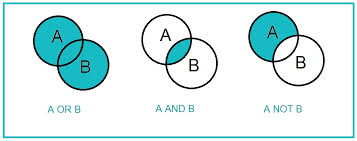
AND, OR, NOT operators
These three operators are the building blocks of every Boolean search.
- AND narrows your results. Both terms must appear in the document. Searching
copyright AND infringementreturns only documents containing both words. - OR broadens your results. Either term can appear. Searching
negligence OR carelessnessreturns documents containing at least one of those words. - NOT excludes terms. Searching
copyright AND infringement NOT "fair use"removes any document mentioning "fair use."
You can combine all three in a single query: copyright AND infringement NOT "fair use" returns documents about copyright infringement while filtering out fair use discussions.
A common mistake: using AND when you mean OR. If you search negligence AND carelessness, you'll only get documents using both words. If you want everything discussing either concept, use OR.
Proximity operators
Proximity operators find terms that appear near each other, which is more precise than a simple AND search.
- NEAR/n finds terms within n words of each other, in any order.
negligence NEAR/5 dutyfinds documents where "negligence" and "duty" appear within 5 words of each other. - W/n works like NEAR/n but requires the terms to appear in the order you typed them.
contract W/3 breachfinds "contract" followed by "breach" within 3 words. - PRE/n requires the first term to precede the second within n words. Functions similarly to W/n depending on the database.
These are especially useful for finding legal phrases and concepts that aren't always written as exact multi-word strings.
Truncation and wildcards
Truncation and wildcards let you search for word variations without typing every possible form.
- Asterisk (*) replaces any number of characters at the end of a word.
neglig*finds negligence, negligent, negligently, and negligible. - Question mark (?) replaces exactly one character.
wom?nfinds both woman and women. - Exclamation point (!) functions as a root expander in some databases (particularly Westlaw), working similarly to the asterisk.
Truncation is powerful but can backfire. A stem that's too short (like con*) will return thousands of irrelevant results. Keep your stems specific enough to capture useful variations without flooding your results.
Parentheses for grouping
Parentheses control the order of operations, just like in math. Without them, the database may interpret your query differently than you intended.
Compare these two searches:
copyright OR trademark AND infringement— the database may process AND first, giving you all trademark infringement cases plus everything mentioning copyright(copyright OR trademark) AND infringement— now the database first groups copyright and trademark together, then requires infringement to appear alongside either one
A more complex example: (copyright OR trademark) AND infringement NOT (fair use OR parody) returns documents about copyright or trademark infringement while excluding fair use and parody discussions.
When in doubt, add parentheses. They make your search logic explicit and prevent the database from guessing what you meant.
Keyword selection
The operators only work as well as the keywords you feed them. Choosing the right terms is half the battle in legal research.
Synonyms and related terms
Legal concepts often go by multiple names. If you search for only one term, you'll miss relevant documents that use different language.
For example, a search about "tort" should also consider terms like "civil wrong," "negligence," and "liability." A personal injury search might need "damages," "compensation," and "recovery."
To build a strong keyword list:
- Check legal dictionaries and thesauri for alternative terms
- Include common abbreviations and acronyms (e.g., "DUI" and "driving under the influence")
- Account for regional variations ("solicitor" vs. "attorney" in different jurisdictions)
Broad vs. narrow terms
Broad terms cast a wide net; narrow terms target specific issues. Effective searching usually requires both.
- Broad:
constitutional law— captures a huge range of documents - Narrow:
First Amendment commercial speech doctrine— targets a specific legal issue
Start broad to get a sense of the landscape, then narrow your terms as you identify the specific issues that matter for your research question.
Legal terminology considerations
Legal language has quirks that affect your keyword choices:
- Latin phrases like res ipsa loquitur or mens rea are still widely used in case law and should be included when relevant
- Statutory language matters — search for the exact phrasing a statute uses, including section numbers
- Historical terms may appear in older cases (e.g., "alienation of affections" in older tort law)
- Jurisdiction-specific terms vary; what one state calls "summary judgment" another might phrase slightly differently in its rules
Always search for both the formal legal term and its plain-language equivalent to maximize coverage.
Search field limitations
Most legal databases let you restrict your search to specific parts of a document. Using these field limitations keeps your results focused.
Title vs. full text search
- Title searches look only at document titles, case names, or headnotes. Use these when you know the name of a specific case or statute.
- Full text searches scan the entire document. Use these for comprehensive topic research.
Title searches are faster and more precise for known documents. Full text searches catch more results but produce more noise. You can combine both: run a title search first for key cases, then a full text search to find related materials.
Date range restrictions
Date filters let you limit results to a specific time period. This is useful for:
- Finding only current law (e.g., cases decided in the last 5 years)
- Tracking how the law changed after a landmark decision
- Researching historical legal developments
For statutes and regulations, pay attention to the date of last amendment, not just the original enactment date.
Jurisdiction filters
Jurisdiction filters narrow results to specific courts, states, or levels of government.
- Federal vs. state filters ensure you're applying the correct body of law
- Circuit court filters help you find binding precedent in your jurisdiction
- Multi-jurisdiction searches allow comparative analysis across states
Always set jurisdiction filters before running your search. Forgetting this step is one of the most common ways to waste time on irrelevant results.
Advanced search techniques
Once you're comfortable with the basics, these techniques let you build more targeted queries.
Phrase searching
Wrapping terms in quotation marks searches for that exact phrase. "reasonable person standard" returns only documents containing those three words in that exact order.
This is especially useful for:
- Multi-word legal concepts ("fruit of the poisonous tree")
- Case names ("Miranda v. Arizona")
- Statutory phrases ("due process of law")
You can combine phrase searches with Boolean operators: "reasonable person standard" AND negligence NOT "gross negligence".
Nesting Boolean operators
Nesting means using parentheses to create layered logic within a single search. This is where you combine everything you've learned.
Example: (copyright OR trademark) AND (infringement OR violation) AND damages
This search finds documents that discuss either copyright or trademark, in the context of either infringement or violation, and that also mention damages. Each parenthetical group is evaluated first, then the AND operators connect them.
Build nested searches step by step. Start with one parenthetical group, test it, then add layers.
Field-specific searches
Beyond title and full text, databases offer field codes that target specific document sections:
- author: for law review articles and secondary sources
- judge: for opinions by a specific judge
- headnote: for searching within West headnotes on Westlaw
- footnote: for finding sources cited in footnotes
Combine field codes with Boolean operators for highly targeted queries. For example, searching judge(Posner) AND "economic analysis" on Westlaw returns opinions by Judge Posner that discuss economic analysis.
Legal database specifics
Each legal database has its own tools and quirks. Knowing the differences helps you pick the right platform for each research task.
Westlaw vs. LexisNexis
| Feature | Westlaw | LexisNexis |
|---|---|---|
| Topic organization | West Key Number System | Lexis Topics |
| Citation analysis | KeyCite | Shepard's Citations |
| Search approach | Terms and Connectors + WestSearch | Boolean + Smart Search |
| Unique content | Certain treatises, practice guides | Different treatise collections |
Both platforms use natural language processing, but their algorithms produce different results for the same query. Running the same search on both databases often turns up cases the other missed.
Court-specific search tools
- PACER (Public Access to Court Electronic Records) provides federal court dockets and filings
- State court e-filing systems vary widely by jurisdiction in quality and searchability
- Supreme Court databases offer comprehensive access to SCOTUS opinions and oral arguments
- Specialized court databases exist for bankruptcy, tax court, and administrative proceedings
Secondary source searches
Secondary sources provide analysis and context that primary sources don't. Key databases include:
- HeinOnline and JSTOR for law review articles and journals
- American Jurisprudence (Am. Jur.) and Corpus Juris Secundum (C.J.S.) for legal encyclopedias
- ALR (American Law Reports) for in-depth annotations on narrow legal issues
- Practice guides and form books searchable by topic or jurisdiction within Westlaw and LexisNexis
Search result analysis
Getting results is only half the job. You need to evaluate what the database gives you.
Relevance ranking
Legal databases rank results using algorithms that consider keyword frequency, where terms appear in the document, and metadata. But higher-ranked results aren't always the most legally significant. A frequently cited Supreme Court case might appear below a lower court opinion that happens to use your search terms more often.
Don't just read the first page of results. Scan deeper, and sort by different criteria (date, court level, citation count) to get a fuller picture.
Citation frequency
The number of times a case or article has been cited is a rough indicator of its importance. Heavily cited sources often represent landmark decisions or seminal scholarship in a field.
But citation frequency alone doesn't tell you everything. A case might be heavily cited because courts keep distinguishing or criticizing it. Always check how a source is being cited, not just how often.
Shepardizing and KeyCite
Before relying on any case, you must verify it's still good law.
- Run Shepard's (LexisNexis) or KeyCite (Westlaw) on the case
- Check the signal indicators — a red flag or stop sign means the case has been overruled or is no longer good law
- Review the citing references to see how later courts treated the case (followed, distinguished, criticized)
- Look at the citation history to trace the case's procedural path
These tools also help you find related cases. If a court cited your case favorably, the citing case likely discusses similar legal issues.

Refining search strategies
Legal research is iterative. Your first search rarely gives you everything you need.
Iterative searching process
- Start with a broad search to survey the landscape
- Review initial results and identify new keywords, legal terms, or concepts you hadn't considered
- Incorporate those new terms into a refined search
- Alternate between Boolean searches and natural language searches to catch different results
- Document your search process so you can reproduce it later or demonstrate thoroughness
Adjusting for over-inclusion
If you're getting too many irrelevant results:
- Add NOT operators to exclude unrelated topics or jurisdictions
- Replace broad terms with more specific legal terminology
- Apply additional filters (date range, court level, document type)
- Switch from full text to field-specific searches
- Use proximity operators instead of AND to require terms to appear near each other
Narrowing for precision
To zero in on exactly what you need:
- Use specific legal tests or doctrinal language as search terms
- Add procedural posture terms (e.g., "summary judgment," "motion to dismiss")
- Limit to particular document types (cases, statutes, regulations)
- Tighten proximity operators (change NEAR/10 to NEAR/5)
- Build more complex nested Boolean queries with additional parenthetical groups
Boolean search limitations
Boolean searching is powerful, but it has real limitations. Knowing what it can't do helps you choose the right tool for each task.
Natural language alternatives
Natural language searching lets you type a question or statement in plain English, like "Can a landlord evict a tenant for having a pet?" The database's algorithm interprets your intent and returns relevant results.
This approach is more intuitive and can surface documents that a Boolean search misses, especially when you're unsure of the exact legal terminology. The tradeoff is less control over what the database returns.
Semantic search comparisons
Semantic search goes beyond matching exact words. It analyzes the meaning and context of your query, incorporating synonyms and related concepts automatically. This is particularly useful for novel legal issues where the terminology isn't settled yet.
The downside: semantic search can be unpredictable. You may not understand why certain results appear, making it harder to ensure comprehensive coverage.
AI-powered legal research tools
Tools like CaseText's CoCounsel, Westlaw Edge's AI features, and LexisNexis+ use machine learning to enhance research. These tools can:
- Identify relevant cases based on factual similarity rather than keyword matching
- Analyze briefs and suggest missing authorities
- Provide predictive analytics for case outcomes
These tools are evolving rapidly. They complement Boolean searching but don't replace the need to understand how to construct precise queries yourself.
Ethical considerations
Research technique isn't just a practical skill; it carries ethical weight in the legal profession.
Thoroughness in research
Lawyers have an ethical duty to conduct comprehensive research on client matters. Failing to find relevant, controlling authority can constitute malpractice. This means:
- Searching multiple databases and using different search strategies
- Updating research before filing deadlines to capture recent developments
- Balancing thoroughness with the practical constraints of time and client budgets
Duty of competence
ABA Model Rule 1.1 requires lawyers to provide competent representation, which includes the ability to perform adequate legal research. This obligation extends to staying current with research technologies. If a new tool or database would meaningfully improve your research, competence may require learning to use it.
Citing non-traditional sources
As legal research increasingly involves online sources, citation and verification challenges arise. Web content can change or disappear, so you should:
- Archive or screenshot cited online materials
- Evaluate the authority and credibility of non-traditional sources carefully
- Follow your jurisdiction's citation rules for online materials
- Use established legal sources as primary authority whenever possible