
Cloud computing has transformed how organizations access and manage IT resources. It offers on-demand, scalable services that can be quickly provisioned and released with minimal effort. This model provides flexibility and cost-efficiency, allowing businesses to focus on their core competencies.
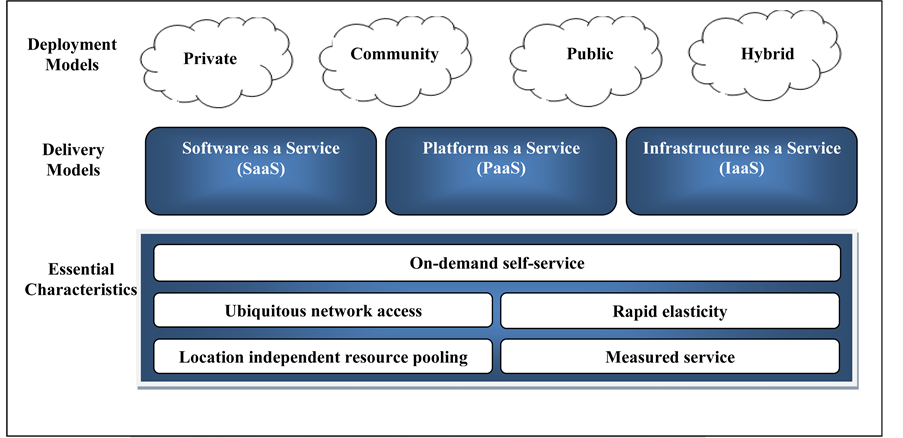
The National Institute of Standards and Technology (NIST) defines cloud computing through five essential characteristics: on-demand self-service, broad network access, resource pooling, rapid elasticity, and measured service. These features distinguish cloud computing from traditional IT models and drive its widespread adoption.
Cloud computing overview
- Cloud computing revolutionized how computing resources are provisioned and consumed, shifting from traditional on-premises infrastructure to a more flexible, scalable, and cost-effective model
- The National Institute of Standards and Technology (NIST) provides a widely accepted definition of cloud computing that outlines its essential characteristics, service models, and deployment models
- Understanding the key aspects of cloud computing is crucial for organizations to make informed decisions when adopting and leveraging cloud technologies in their IT strategies
NIST definition of cloud computing
- NIST defines cloud computing as a model for enabling ubiquitous, convenient, on-demand network access to a shared pool of configurable computing resources (networks, servers, storage, applications, and services)
- These resources can be rapidly provisioned and released with minimal management effort or service provider interaction
- The NIST definition emphasizes the essential characteristics that distinguish cloud computing from traditional computing models
Essential characteristics of cloud computing
- On-demand self-service: Users can provision computing resources automatically without requiring human interaction with the service provider
- Broad network access: Services are accessible over the network using standard mechanisms, supporting heterogeneous client platforms
- Resource pooling: Provider's computing resources are pooled to serve multiple consumers, with different physical and virtual resources dynamically assigned and reassigned according to consumer demand
- Rapid elasticity: Capabilities can be rapidly and elastically provisioned, giving the appearance of unlimited resources available for scaling
- Measured service: Resource usage is automatically controlled, optimized, and reported, providing transparency for both the provider and consumer
On-demand self-service
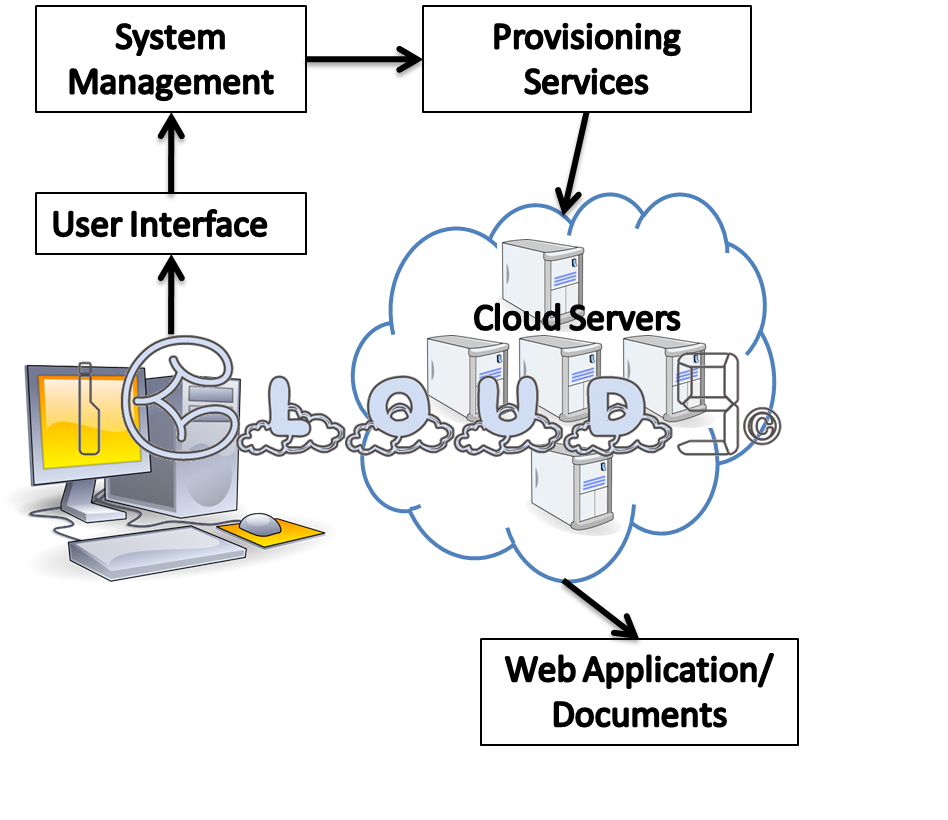
- Cloud computing enables users to provision computing resources, such as virtual machines, storage, and applications, automatically without the need for human interaction with the service provider
- Users can access a self-service portal or API to request and manage resources on-demand, eliminating the need for manual provisioning processes
Provisioning computing resources automatically
- On-demand self-service allows users to instantly provision the required computing resources through automated processes
- Users can specify the desired configuration, such as the number and type of virtual machines, storage capacity, and network settings
- The cloud platform automatically allocates and configures the requested resources, making them available for immediate use
Eliminating need for human interaction
- Traditional IT provisioning often involves manual processes and approvals, leading to delays and inefficiencies
- On-demand self-service eliminates the need for users to interact with IT staff or raise service requests for resource provisioning
- Users have the autonomy to provision resources as needed, reducing the time and effort required to obtain the necessary computing resources
Broad network access
- Cloud computing services are designed to be accessed over the network using standard protocols and mechanisms
- Users can access cloud services from various devices and locations, as long as they have network connectivity
Accessing services over the network
- Cloud services are accessible through the internet or dedicated network connections, allowing users to connect from anywhere
- Users can access cloud services using web browsers, APIs, or client applications, depending on the service and user preferences
- Network access enables users to leverage cloud resources remotely, without the need for physical proximity to the infrastructure
Support for heterogeneous client platforms
- Cloud services are designed to support a wide range of client platforms, including desktops, laptops, tablets, and smartphones
- Users can access cloud services using different operating systems (Windows, macOS, Linux) and device types
- Cloud providers offer client libraries, SDKs, and APIs that enable developers to build applications that integrate with cloud services across various platforms
Resource pooling
- Cloud providers pool their computing resources, such as servers, storage, and network, to serve multiple consumers simultaneously
- Resources are dynamically assigned and reassigned based on consumer demand, optimizing utilization and efficiency
Serving multiple consumers from pooled resources
- Cloud providers maintain a large pool of computing resources that can be shared among multiple consumers or tenants
- Each consumer is allocated a portion of the pooled resources based on their requirements and service level agreements (SLAs)
- Resource pooling enables cloud providers to achieve economies of scale and efficiently manage their infrastructure
Dynamic resource assignment and reassignment
- Cloud platforms dynamically assign resources to consumers based on their workload demands and usage patterns
- Resources can be reassigned from one consumer to another as needed, ensuring optimal utilization and performance
- Dynamic resource assignment allows cloud providers to accommodate fluctuating workloads and scale resources up or down based on consumer requirements
Rapid elasticity
- Cloud computing enables the rapid scaling of resources, both vertically (increasing the capacity of individual resources) and horizontally (adding more instances of resources)
- Resources can be quickly provisioned and released to match the changing demands of applications and workloads
Quickly scaling resources up and down
- Cloud platforms provide mechanisms to rapidly scale resources based on workload requirements
- Users can easily increase or decrease the number of virtual machines, storage capacity, or network bandwidth as needed
- Scaling can be automated based on predefined rules or triggered manually by users or administrators
Appearance of unlimited resource availability
- Cloud computing gives the impression of having unlimited resources available for scaling
- While resources are not truly unlimited, cloud providers maintain large resource pools and can dynamically allocate additional resources as needed
- The ability to quickly scale resources creates a sense of on-demand availability and reduces the need for upfront capacity planning
Measured service
- Cloud computing provides automatic control and optimization of resources through metering and monitoring capabilities
- Resource usage is transparently monitored, controlled, and reported, enabling both the provider and consumer to have visibility into the consumed services
Automatic control and optimization of resources
- Cloud platforms automatically control and optimize resource allocation based on the measured usage and performance metrics
- Resources are dynamically adjusted to ensure optimal performance and cost-efficiency
- Automatic control mechanisms help prevent over-provisioning or under-utilization of resources
Usage monitoring and reporting for transparency
- Cloud providers monitor and track resource usage at a granular level, capturing metrics such as CPU utilization, storage consumption, and network traffic
- Detailed usage reports and analytics are provided to consumers, enabling them to understand their resource consumption patterns and costs
- Transparency in usage monitoring and reporting helps consumers make informed decisions about resource allocation and cost optimization
Service models
- Cloud computing offers different service models that define the level of control and responsibility shared between the provider and consumer
- The three main service models are Infrastructure as a Service (IaaS), Platform as a Service (PaaS), and Software as a Service (SaaS)
Infrastructure as a Service (IaaS)
- IaaS provides consumers with fundamental computing resources, such as virtual machines, storage, and networks
- Consumers have control over the operating systems, storage, and deployed applications, while the provider manages the underlying infrastructure
- Examples of IaaS include Amazon Web Services (AWS) EC2, Microsoft Azure Virtual Machines, and Google Compute Engine
Platform as a Service (PaaS)
- PaaS provides consumers with a platform to develop, run, and manage applications without the complexity of building and maintaining the underlying infrastructure
- Consumers have control over the deployed applications and possibly the hosting environment configurations
- Examples of PaaS include AWS Elastic Beanstalk, Microsoft Azure App Service, and Google App Engine
Software as a Service (SaaS)
- SaaS provides consumers with access to software applications running on a cloud infrastructure, accessible through a web browser or API
- The provider manages the entire application stack, including the underlying infrastructure, middleware, and software
- Examples of SaaS include Salesforce, Microsoft Office 365, and Google Workspace
Deployment models
- Cloud computing offers different deployment models that determine the ownership, control, and accessibility of the cloud infrastructure
- The four main deployment models are public, private, community, and hybrid clouds
Public vs private clouds
- Public clouds are owned and operated by third-party service providers, making resources available to the general public over the internet
- Private clouds are dedicated to a single organization, either managed internally or by a third-party provider, offering greater control and security
- Public clouds offer scalability and cost-efficiency, while private clouds prioritize data sovereignty and customization
Community vs hybrid clouds
- Community clouds are shared among several organizations with common concerns, such as security, compliance, or jurisdiction
- Hybrid clouds combine two or more distinct cloud infrastructures (public, private, or community) that remain unique entities but are bound together
- Community clouds enable collaboration and resource sharing among organizations with similar requirements
- Hybrid clouds allow organizations to leverage the benefits of both public and private clouds, enabling workload portability and flexibility