Choose the right printable resource
Match the Print center resource to your class task without hunting through every option.
Quick answer
Choose Subject, then open What to print. Use a study guide or cheatsheet for review, MCQs or SAQs for practice, an FRQ type for free response, AMSCO Guided Notes for a supported chapter, or Full Practice Exam for a course-wide simulation. Only resources available for that subject appear.
What to do
Choose Subject first
Open Subject and select the AP® course you teach. Wait for What to print to refresh before choosing the resource. Your choice determines every option that appears next.
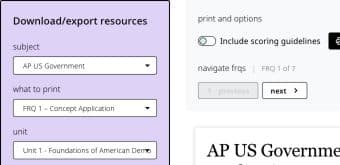
Choose the subject first. Print center then shows only the resource and follow-up choices available for that course. For reading and review
Open What to print. Choose Topic Study Guide for one topic, Official Fiveable Cheatsheet for a compact summary, or Glossary or Unit Overview when either appears for the selected course.
For question practice
Choose MCQs (no stimulus) for standalone questions, Stimulus-based MCQs for grouped questions, Short Answer Questions - Stimulus-Based for SAQs, or the named FRQ type students should practice.
For a larger assessment
Choose Full Practice Exam when the subject supports it. World-language courses may instead show Practice Exam (Written Companion).
For a textbook companion
Choose AMSCO Guided Notes when the selected subject has supported chapters. AP Government may also offer Weekly Vocab Quiz.
Complete the new fields that appear
Choose the Unit, Topic, Chapter, question count, or other field shown below What to print. The fields change to match the resource you selected.
Check the preview before using an action
Read the preview title and first page. Then use the action above it, such as Print, Export to Google Docs, Export to Google Forms, or Assign it online.

Verify the title, unit, and first page in the preview before printing or exporting.
If something is not working
The resource I expected is not listed.
Confirm Subject first. Print center only shows resource types supported for the selected course.
The resource changed when I switched subjects.
That is expected when the new subject does not support the previous type. Choose from the updated What to print list.
Did this guide answer your question?