
Sound is the backbone of audio production. Mastering sound levels and monitoring techniques is crucial for creating high-quality recordings. This topic dives into the nitty-gritty of decibels, audio meters, and gain staging.
Understanding these concepts helps you capture clean, distortion-free audio. We'll explore tools like headphones and studio monitors, and learn how to optimize signal-to-noise ratios. These skills are essential for any aspiring audio engineer or producer.
Decibels in audio
Understanding decibels and their relevance
- Decibels (dB) are a logarithmic unit used to measure the intensity or loudness of sound
- The decibel scale is not linear, meaning a 3 dB increase represents a doubling of sound intensity, while a 10 dB increase is perceived as twice as loud
- In audio recording, decibels are used to measure and compare sound pressure levels (SPL) of various audio sources (microphones, instruments, speakers)
- Understanding the decibel scale is crucial for setting appropriate gain levels and maintaining a clean, distortion-free signal throughout the recording process
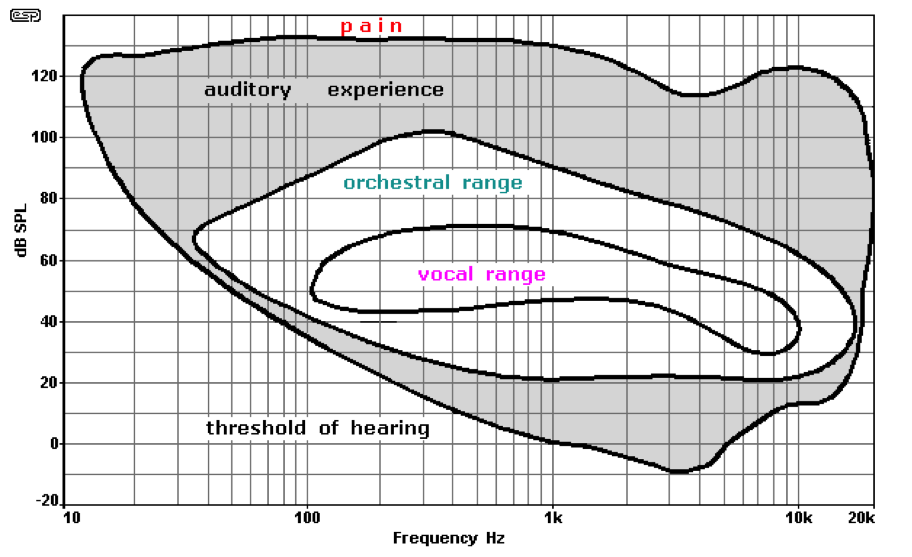
- The human ear can perceive a wide range of sound pressure levels
- Threshold of hearing at 0 dB SPL
- Threshold of pain at around 130 dB SPL
- Prolonged exposure to high sound levels above 85 dB SPL can cause hearing damage over time
Reference levels in audio systems
- Reference levels are used in audio systems to establish a consistent baseline for measuring and comparing decibel values
- Common reference levels include:
- dBFS (decibels relative to full scale): Used in digital audio systems, where 0 dBFS represents the maximum possible level before digital clipping occurs
- dBu (decibels unloaded): Used in professional audio equipment to measure voltage levels, with 0 dBu equal to 0.775 volts
- dBVU (decibels volume units): Used in analog audio systems, particularly in VU meters, to measure average signal levels
Audio Meter Interpretation
Types of audio meters and their uses
- Audio meters visually display the signal levels of audio sources in real-time, allowing engineers to monitor and adjust levels as needed
- The most common types of audio meters are:
- Peak meters: Display the instantaneous peak levels of an audio signal, helping to identify and prevent clipping or distortion
- Digital peak meters often use dBFS as the unit of measurement, with 0 dBFS representing the maximum level before clipping
- VU (volume unit) meters: Display the average signal level over a short period (typically 300 milliseconds)
- VU meters are calibrated in dBVU and are useful for monitoring the overall perceived loudness of a signal
- Peak meters: Display the instantaneous peak levels of an audio signal, helping to identify and prevent clipping or distortion
Setting levels and monitoring during recording
- When setting levels during recording, aim to keep the average signal level around 0 VU or -18 dBFS, with peaks not exceeding -10 dBFS
- This practice ensures a strong, clean signal while leaving room for dynamics and further processing (headroom)
- Regularly monitor levels during recording and adjust the gain or fader settings as needed to maintain consistent, appropriate signal levels across all audio sources
- Be aware of the dynamic range of each source and anticipate level changes to avoid clipping or excessive noise
Gain Staging Techniques
Optimizing signal-to-noise ratio and preventing distortion
- Gain staging is the process of setting and optimizing the gain levels at each stage of the audio signal chain to maintain the best possible signal-to-noise ratio (SNR) and prevent distortion
- Proper gain staging is essential for achieving a clean, professional-sounding recording
- The signal-to-noise ratio compares the level of the desired audio signal to the level of background noise in the system
- A higher SNR means the signal is cleaner and more prominent relative to the noise floor
Gain staging best practices
- To optimize gain staging, start by setting the input gain on the microphone preamplifier or line input to achieve a strong, clean signal without clipping
- Aim for a peak level around -10 dBFS or 0 VU, depending on the meter type
- As the signal passes through various devices in the chain (equalizers, compressors, faders), adjust the input and output levels of each device to maintain a consistent, optimal signal level
- Avoid boosting the gain excessively at any stage, as this can introduce noise or distortion
- Use the unity gain principle when possible, setting the output level of a device to match its input level
- This helps maintain a consistent signal level throughout the chain and minimizes the risk of clipping or noise accumulation
- Regularly check levels at each stage of the signal chain using audio meters to ensure proper gain staging is maintained
- Make adjustments as needed to keep the signal clean and free of distortion

Critical Listening Tools
Headphones and their applications
- Headphones are essential tools for monitoring audio during recording, allowing engineers to make critical listening decisions and adjustments in real-time
- Closed-back headphones provide good isolation from external noise, making them ideal for tracking and monitoring in the studio
- They allow engineers and performers to hear the audio mix clearly without bleed from the headphones being picked up by microphones
- Open-back headphones offer a more natural, spacious sound but provide less isolation
- They are better suited for mixing and critical listening in quiet environments where bleed is not a concern
Studio monitors and room acoustics
- Studio monitors are designed to provide a flat, accurate frequency response, enabling engineers to make informed decisions about the balance, clarity, and overall quality of the audio
- Place monitors at an equal distance from the listening position, forming an equilateral triangle, to ensure a balanced stereo image
- When using studio monitors, control the acoustic environment of the room to minimize reflections, standing waves, and other unwanted acoustic effects
- Use acoustic treatment (absorption panels, bass traps) to improve the room's sound and ensure a more accurate monitoring experience
Referencing audio on multiple systems
- Regularly reference audio on both headphones and studio monitors to get a comprehensive understanding of the mix
- Headphones offer a detailed, focused perspective, while monitors provide a sense of space, depth, and how the mix translates to a room
- Avoid making critical decisions based solely on one monitoring system
- Check mixes on various playback systems (car stereos, consumer headphones, home speakers) to ensure the audio translates well across different devices and listening environments