AP Cybersecurity Unit 1 Cheatsheet: Introduction to Security

AP Cybersecurity Unit 1 Cheatsheet: Introduction to Security

Start with the first 4 sections of the Unit 1 one-page cheatsheet below. The full sheet is a PDF you can print.

Social Engineering: Tactics & Psychological Levers

Definition: Psychological manipulation to trick users into revealing information, downloading malware, or clicking malicious links—via email, text, social media, or in person.

Key Tactics:

  • Intimidation: Threaten negative consequences to force compliance; exploits fear of loss
  • Urgency: Create time pressure; prevents careful consideration of safety
  • Elicitation: Extract sensitive information through conversation

Why They Work: Rely on natural human psychology—aversion to negative outcomes and instinct to act quickly on time-sensitive needs.
Social Engineering: Victim Impacts

Personal Information Theft:

  • Name, phone, address, workplace, pet names, birthdate
  • Used as answers to identity-verification challenge questions
  • Leads to impersonation and account takeover

Secure Information Compromise:

  • One-time passwords (OTP), authentication codes
  • Allows adversary to log in as victim

Malware & Credential Capture:

  • Malicious downloads install malware
  • Malicious links steal browser data or redirect to credential-harvesting sites

Password Attacks & Weak Authentication

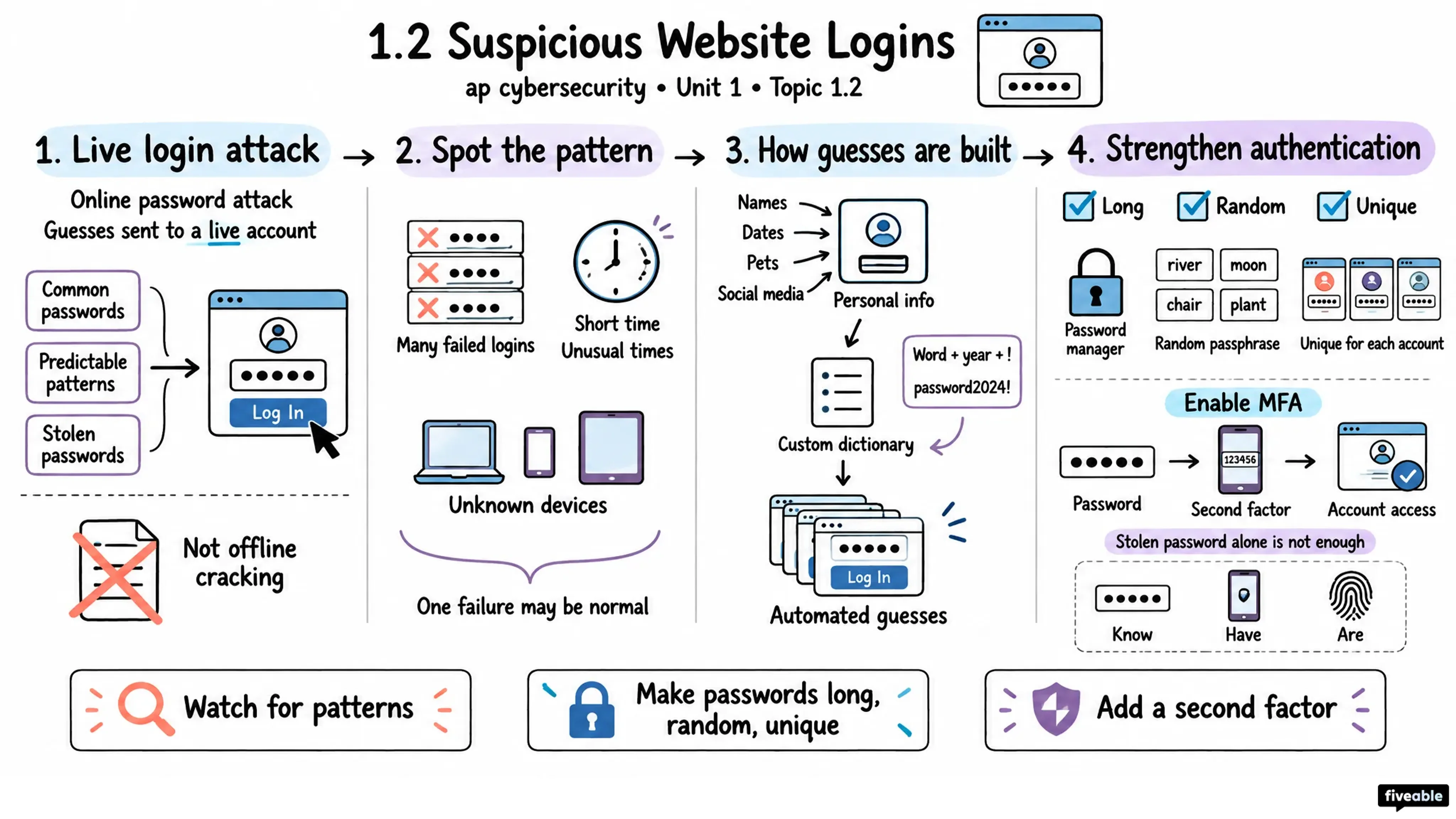
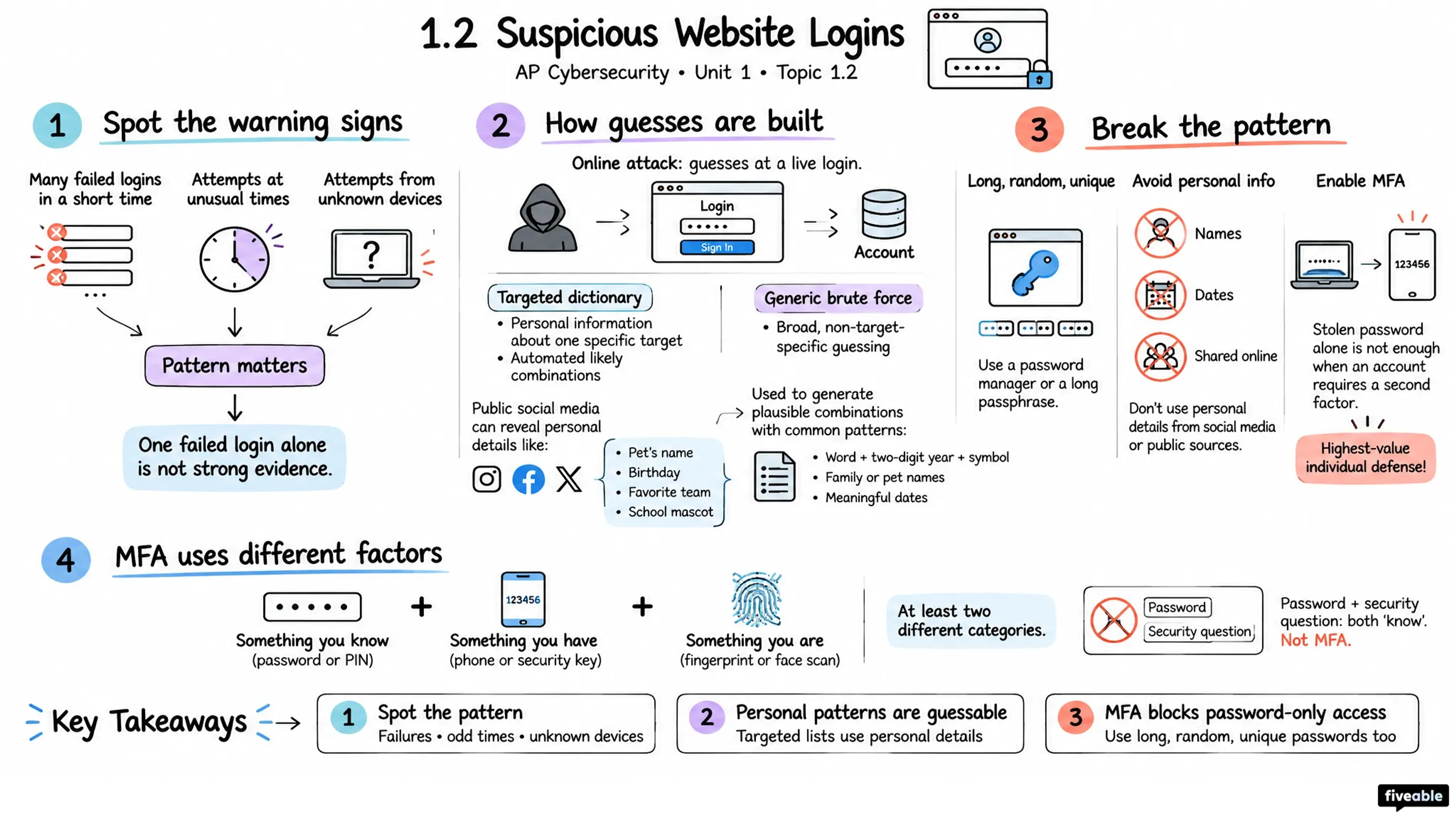
Online Password Attack Signs:

  • Many failed login attempts in short time
  • Login attempts at unusual times
  • Login attempts from unknown devices

Common Password Patterns Adversaries Exploit:

  • Word(s) + 2-digit year + special character
  • Family/pet names
  • Personally significant dates

Attack Method: Adversaries build password dictionaries from personal info (birthdays, anniversaries, pet names) and use automated tools to submit candidates.

Strong Authentication & Defense

Password Best Practices:

  • Long, random, unique passwords
  • Avoid names, dates, personally meaningful words/numbers
  • Use password manager to generate and store securely
  • Or create long, unique passphrases

Multifactor Authentication (MFA):

  • Requires extra proof of identity beyond password (e.g., one-time code)
  • Adds critical second layer of security
  • Enable whenever available

The rest of the Unit 1 sheet

6 more sections are on the one-page PDF:

  • Wireless Attacks: Evil Twin, Jamming, War Driving

  • Public Wi-Fi Protection Strategies

  • AI-Powered Attacks: Voice, Phishing & Data Extraction

  • Defending Against AI-Augmented Attacks

  • AI in Cyber Defense & Threat Detection

  • Adversary Classification & Motivation

Made by you

Visual Cheatsheets

Pick a Unit 1 topic and a format: flowchart, comparison chart, vocab sheet, Cornell notes and more. Ready in about a minute.

Printable PDF · from the Fiveable shop

AP Cybersecurity Unit 1 Cheatsheet

1 page · Introduction to Security · PDF

Visual Cheatsheets

One topic, the format you pick, ready in about a minute

Format

Topic

Takes 30–60 seconds

Preview: Standard

Unit 1: Introduction to Security, topic by topic

Each topic has a full study guide. See the whole unit.