2.1 Areas between Curves

➗Calculus II Unit 2 Review
2.1 Areas between Curves
➗ Calculus II
2.1
Areas between Curves
2.2
Determining Volumes by Slicing
2.3
Volumes of Revolution: Cylindrical Shells
2.4
Arc Length of a Curve and Surface Area
2.5
Physical Applications
2.6
Moments and Centers of Mass
2.7
Integrals, Exponential Functions, and Logarithms
2.8
Exponential Growth and Decay
2.9
Calculus of the Hyperbolic Functions
Area Between Curves
Calculating the area between curves is one of the most common applications of definite integrals. Instead of finding the area under a single curve, you find the area of the region trapped between two curves by integrating the difference of the functions. This technique works whether you integrate with respect to or , and choosing the right variable can make a problem much easier.
When curves intersect more than once, they can create multiple enclosed regions. In those cases, you'll need to break the problem into pieces, integrate each piece separately, and add the results together.

Top images from around the web for Area between two curves
Integral - Wikipedia View original
Is this image relevant?
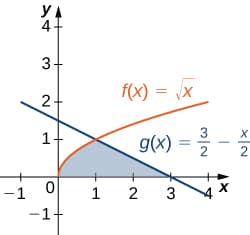
Areas between Curves · Calculus View original
Is this image relevant?
HartleyMath - Area Between Curves View original
Is this image relevant?
Integral - Wikipedia View original
Is this image relevant?
Areas between Curves · Calculus View original
Is this image relevant?
Area Between Two Curves
Integrating with respect to x
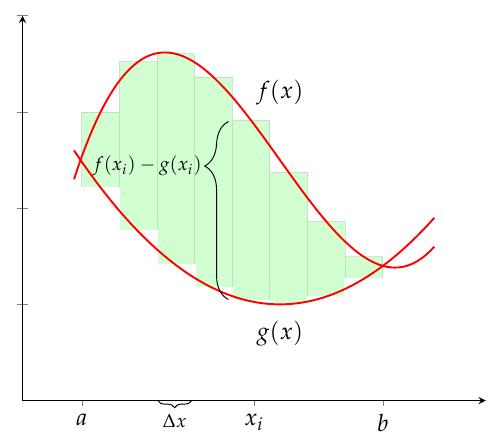
When both curves are written as functions of , the area between and is found by integrating the difference of the upper minus the lower function.
- Find the intersection points. Set and solve for . These x-values become your limits of integration, and .
- Determine which function is on top. On the interval , check which function has larger y-values. That's your upper function.
- Set up and evaluate the integral:
where on .
Example: Find the area between and .
- Set , which gives , so . The intersection points are and .
- On , the line is above the parabola .
- The area is .
Integrating with respect to y
When curves are written as functions of (or are easier to express that way), integrate the right minus the left function.
- Find the intersection points. Set and solve for . These y-values become your limits and .
- Determine which function is farther right. On the interval , the function with larger x-values is the "right" function.
- Set up and evaluate the integral:
This approach is especially useful when curves are given as , or when integrating with respect to would force you to split the region into multiple integrals.
Compound Regions with Intersecting Curves
When curves cross each other within the region, the "upper" and "lower" functions swap. You can't just integrate across the whole interval, because part of the integrand would be negative, and you'd lose area instead of gaining it.
To handle this:
- Find all intersection points of the curves in the region.
- Split the region at each crossing point into subregions where one function stays consistently above (or to the right of) the other.
- Integrate each subregion separately, always subtracting the lower from the upper:
Here, is the x-coordinate where the curves cross, on , and on .
- Add all the subregion areas to get the total.
A common shortcut: you can write the integrand as , which guarantees a non-negative value. In practice, though, you still need to find the crossing points so you can remove the absolute value and evaluate the integral.

Choosing the Right Variable
The variable you integrate with respect to can make or break the difficulty of a problem. Here's how to decide:
- Use when both curves are naturally written as and the upper/lower relationship is clear across the interval.
- Use when curves are given as , or when integrating with respect to would require splitting into multiple integrals but integrating with respect to would not.
- Check both options if the problem doesn't obviously favor one. Sometimes rewriting as collapses two or three integrals into a single one.
For example, the region between and is much simpler to set up with respect to (one integral) than with respect to (which requires splitting the parabola into upper and lower halves and using two separate integrals).
Additional Considerations
- Always sketch the region before setting up the integral. A quick graph helps you identify which function is on top, where the curves intersect, and whether you need to split the integral. Many errors come from skipping this step.
- The integrand must stay non-negative across each piece. If your answer comes out negative, you likely subtracted in the wrong order on some interval.
- The region must be bounded (enclosed on all sides) to produce a finite area. If the problem gives you specific limits like and instead of intersection points, use those as your bounds.
- When curves are given implicitly or aren't functions at all (they fail the vertical line test for -integration), try switching to -integration, or split the curve into pieces that are each functions of your chosen variable.
See Fiveable more often in Google
Mark Fiveable as a preferred source and Google is more likely to show you our guides in Top Stories, with a "preferred" badge in AI Mode and AI Overviews.